Release notes

- Version: 7.3.0
- Build number: 15306
- Release date: 2026-10-08 (general availability)
- Server version: nanitor-7.3.0.15306-18168-master
- Agent version: nanitor-7.3.0.15306-18168-master
- Collector version: nanitor-7.3.0.15306-18168-master
Welcome to Nanitor v7.3.0!
This release helps you adopt new benchmark rules gradually, without a sudden flood of new issues, with the new Baseline rule rollout project type. Custom platform packages can now collect data from devices that only offer an HTTP or HTTPS API, not only SSH. External Attack Surface scanning supports IP addresses, shows when each external asset was last confirmed, and no longer flips ports between open and resolved from day to day. Several fixes remove false positives on Windows and Linux and make vulnerability scanning more reliable. We have also added login rate limiting and sub-organization creation through the System API.
Upgrading agents and collectors brings more accurate vulnerability findings, wider Windows vulnerability coverage and more reliable scanning after startup. Server-side improvements apply as soon as the server is upgraded. See Agent Updates for what needs upgraded agents or collectors, and Practical Information for changes to keep in mind.
Highlights
Baseline Rule Rollout Projects
The new Baseline rule rollout project type is built for benchmarks. Choose benchmark rules that are not yet in your baseline but that you want to fulfill, add them to a project, and work towards them with a deadline. Because the rules are not in the baseline yet, they do not suddenly become new issues. You set a success threshold, which is the share of the assets a rule applies to that must pass it for the rule to count as adopted, for example 80%. The project shows each rule's pass rate and whether it has reached the threshold, together with the share of rules adopted so far. When the project is done, you can promote the rules that reached the threshold into your baseline.
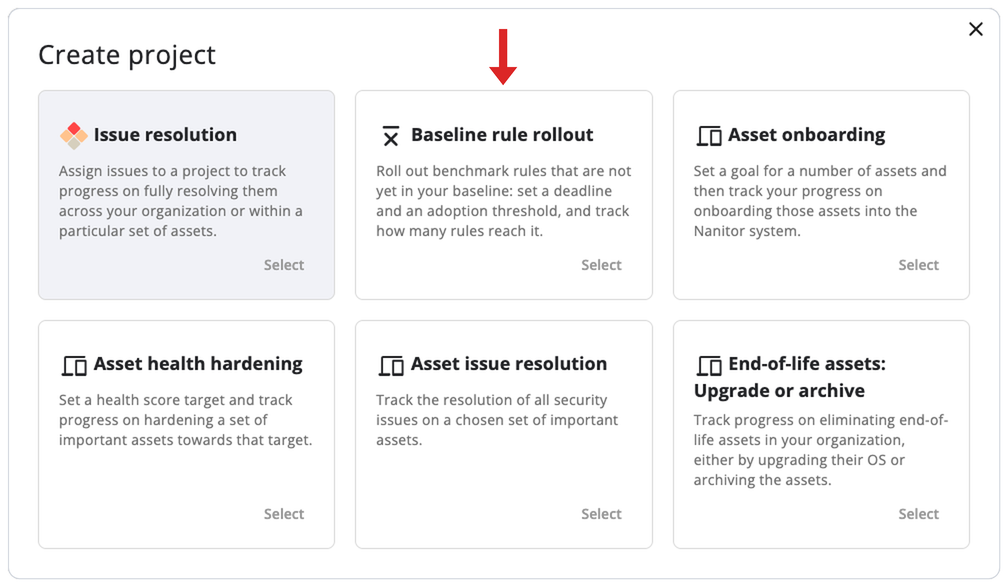
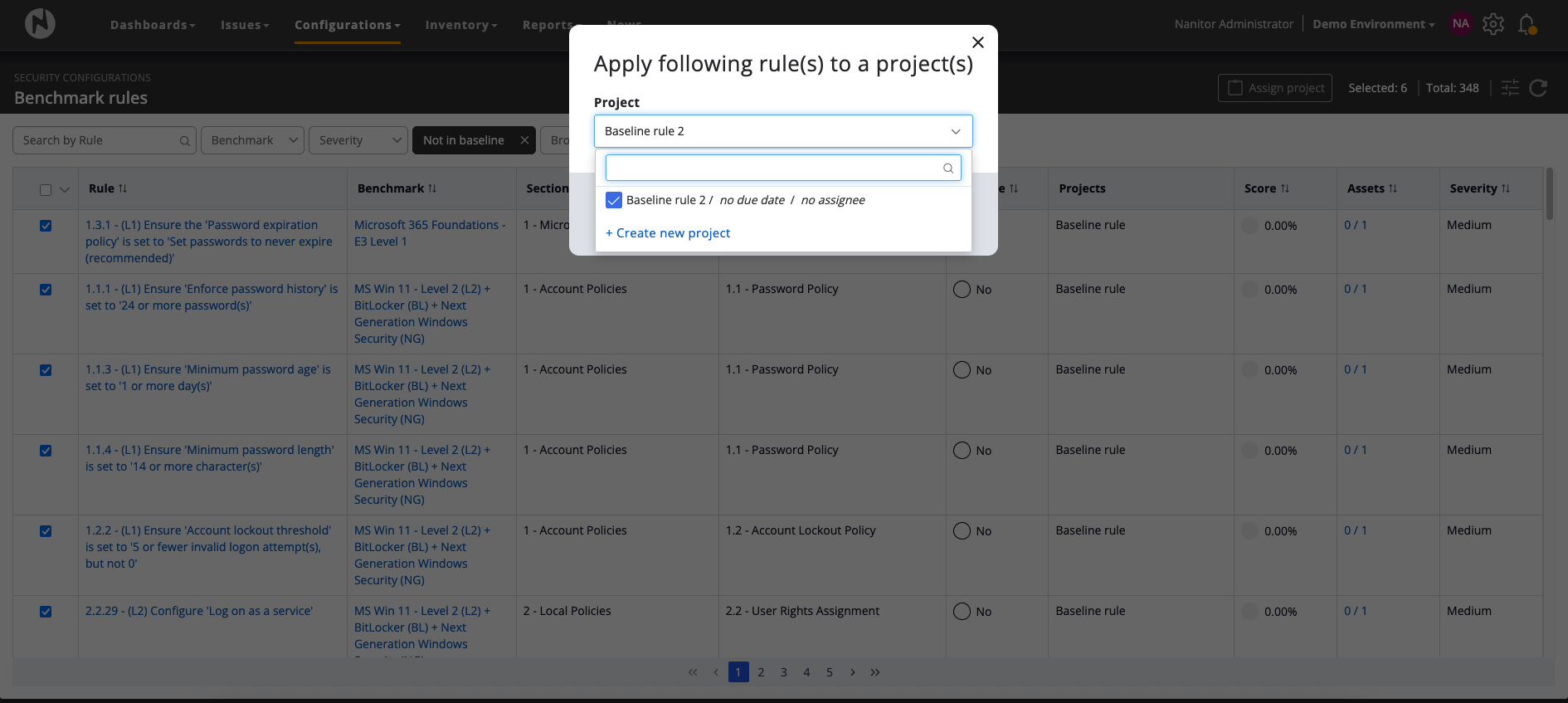
- Pick rules from the rule list: On the Benchmark rules page (opened with All rules on Security Configurations), automated rules that are not in the baseline can now be selected and added to a rollout project with the new Add to Rule Rollout Project button. You can also create a new project from that dialog. A new Projects column shows which projects each rule belongs to.
-
One success threshold for all rules: Each project has a single threshold between 50% and 100% (80% by default). A rule counts as adopted once at least that share of the assets it applies to pass it. An asset that has no result for the rule yet counts as not passing. Progress is calculated from benchmark results Nanitor has already collected, so no new data collection is needed.
-
Track progress per rule: A new Rules tab on the project shows each rule with its section, whether it is in the baseline, how many assets pass, the pass rate, and a Met or Not met badge. The project list and the Kanban cards also show the number of rules. Due dates on all projects now show the days left.
-
Promote on completion: Completing a rollout project opens a summary that separates rules that reached the threshold from rules that did not, and offers to add the rules that reached it to your baseline. For users with the manage benchmarks permission this option is selected by default. Other users do not see it. A rollout can be completed even if some rules are below the threshold. Promoted rules become part of your baseline, so assets that fail them will then create issues, including in sub-organizations that use your baseline. If your organization uses its parent organization's baseline, promoting rules changes the parent's baseline. Creating and completing rollout projects requires the manage projects permission, and promoting rules also requires manage benchmarks.
Asset scope is optional. If no assets or labels are selected, the project measures the whole organization.
Custom Platform Packages: HTTP and HTTPS APIs
Custom platform packages, introduced in v7.2.0 for SSH-based collection, can now also collect data from devices that only offer an HTTP or HTTPS API, for example network appliances with a REST management interface.
-
HTTP connector: Platform definitions can describe HTTP requests, with three authentication modes: basic authentication, a static token, and a token exchange through a login request. Static headers are sent with every request, including the login request. Responses to the same request are fetched once and shared by all checks that need them, and an action can be cached for a configurable time to avoid repeating sensitive requests such as login attempts.
-
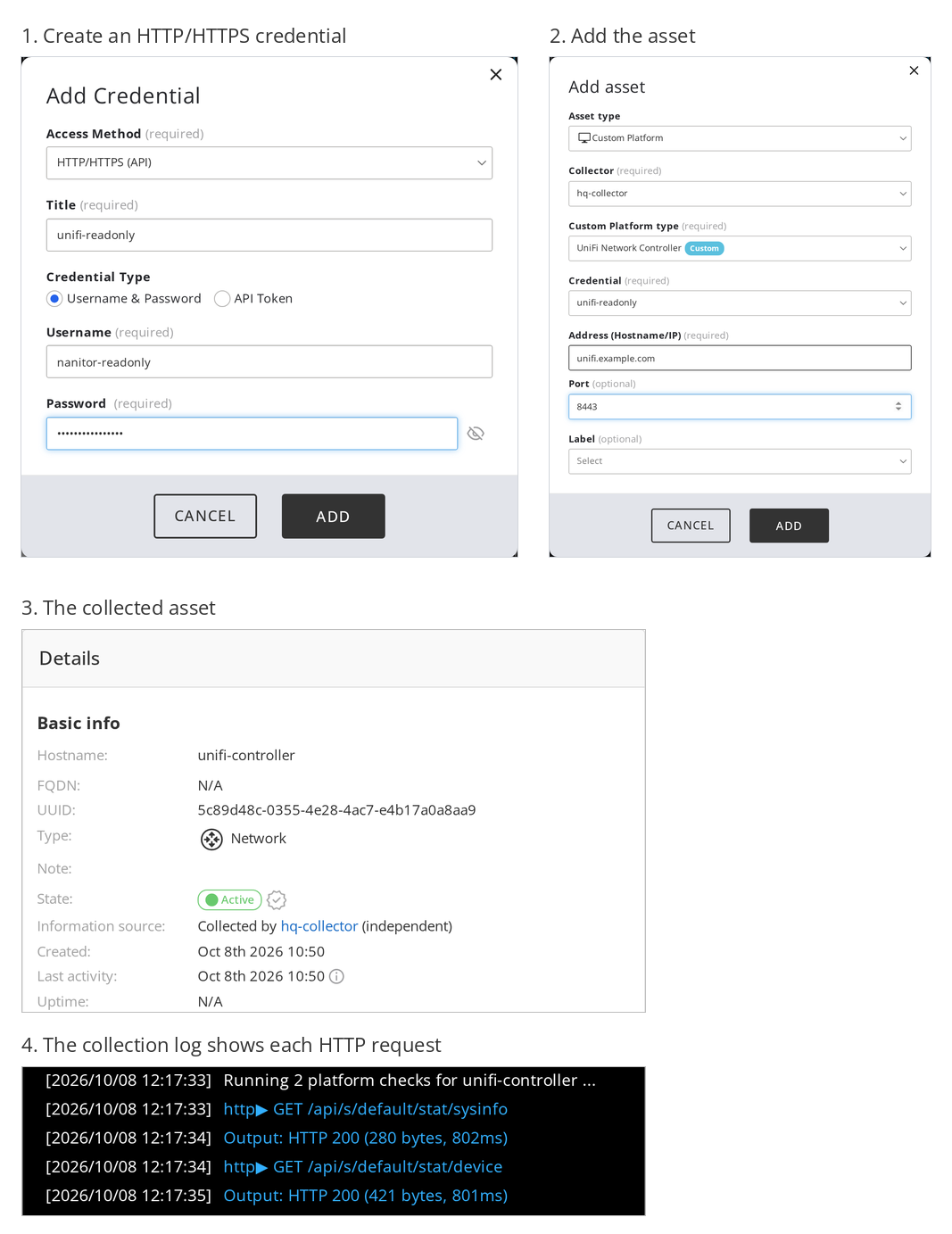
HTTP/HTTPS credentials: The Add/Edit Credential dialog has a new "HTTP/HTTPS (API)" access method with two modes: username and password, or API token. These credentials can only be selected for Custom Platform assets.
-
Easier to find: "Custom Platform" is now always listed as an asset type in the Add Asset dialog. If the selected collector has no platform packages loaded, the dialog now explains why and links to the collector's Platform packages tab, instead of silently doing nothing.
-
Debug output for HTTP: "Show debug information" on a collection result now shows the method, path, status, size and latency of each HTTP request. Response bodies are deliberately not included, and requests made during login are not shown.
-
Partial results: For all custom platforms, a failing check no longer discards the results of the other checks.
-
nandevupdates:nandev testnow supports HTTP platforms,hosts.ymlsupports per-host variable overrides, and the newnandev platforms packagecommand validates a platform directory and builds a distributable.tar.gzarchive.
Platform packages still have to be placed on the collector manually. See the Custom Platform Packages documentation for how to write platform packages. This feature requires an upgraded collector (see Agent Updates).
Custom platforms are in active development
Custom platform support is shaped by feedback. Today it focuses on collecting inventory data from devices that Nanitor does not have a built-in integration for. We are working closely with partners to cover more devices and are interested in their requirements.
Directions we are exploring include linking collected devices to vulnerability information, running configuration benchmarks against them, and letting a single controller bring in the many devices it manages.
If you have a device or use case in mind, please contact Nanitor Support or your account team.
External Attack Surface Improvements
External Attack Surface scanning now accepts IP addresses as targets, shows what each scan found and when it was last confirmed, and keeps external ports from flipping between open and resolved from one scan to the next. Scan data comes from the third-party service Shodan through the Nanitor Hub, so you do not need a Shodan account.
-
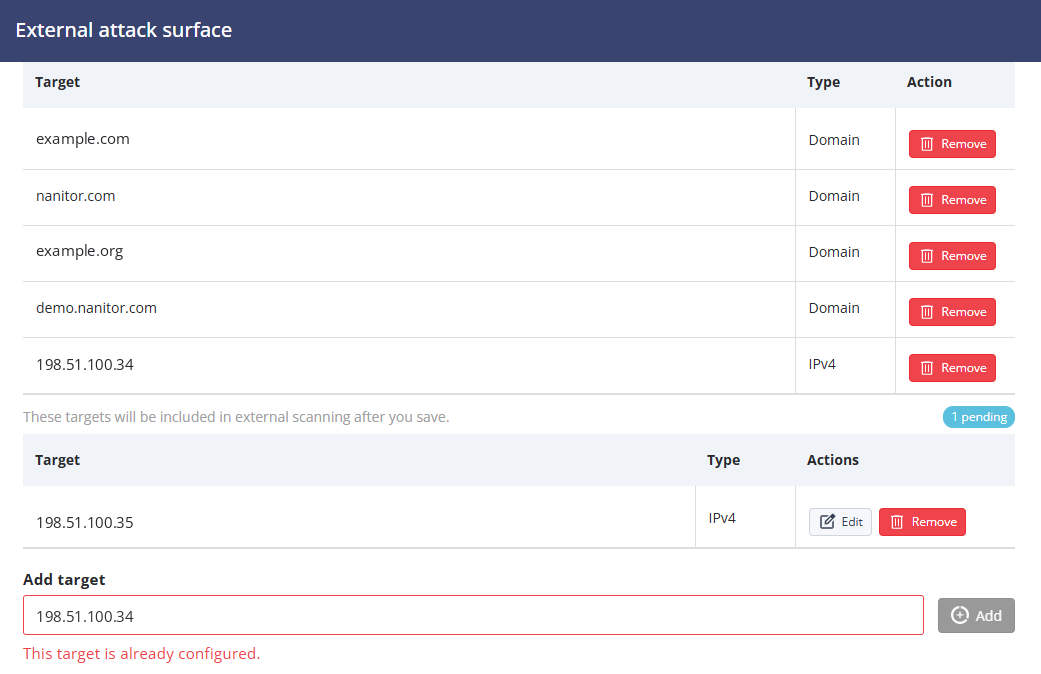
Domains and IP addresses as targets: The External attack surface settings page now accepts validated domains, public IPv4 addresses and public IPv6 addresses. Configured targets and unsaved additions are shown separately, and pending targets can be edited or removed before saving. Existing comma-separated domains are migrated to targets automatically. After the upgrade, scans can discover additional external assets and ports for these domains, because each domain is now also looked up by its resolved IP address.
-
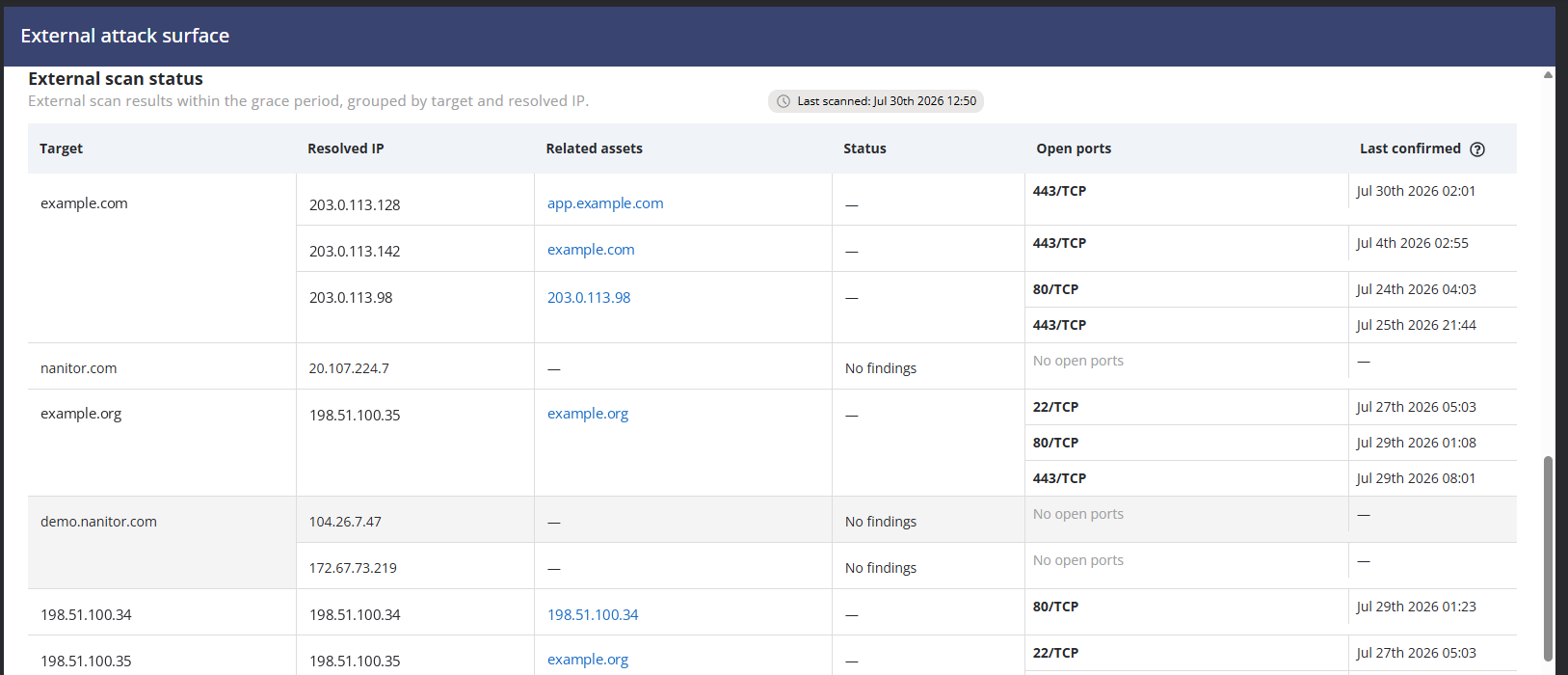
External scan status: A new status table groups scan results by target and resolved IP, with related assets, a status, open ports, and when each port was last confirmed. Targets that returned nothing are still listed, with a "No findings" status.
-
Grace period for open ports: An external port is now resolved only after it has been missing from the external data source for the configured grace period (60 days by default, 1 to 365 days). Previously, a port could be resolved and reopened repeatedly, flooding the Activity Log. After the upgrade, the grace period starts for all currently open external ports, so ports that have closed are resolved once the grace period has passed.
-
Last confirmed: Asset details and the State tooltip now distinguish when an external asset was last confirmed by the external data source from when Nanitor last processed scan data, so stale or inactive external assets are easier to interpret.
-
IP-only assets and CDN addresses: External assets can now be created from IP targets even when no hostname is reported. IP addresses that the external data source identifies as CDN infrastructure are no longer created as, or matched to, external assets. They appear in the scan status table with a CDN status instead. Assets and open ports already recorded for such an IP are no longer updated by the scan. Like other inactive assets, they are archived by your archival rules or flagged for archival confirmation, and you can also archive them manually.
-
Clearer settings page: The settings page now explains how the feature works, that it relies on the third-party data source Shodan, how fresh the data is, and how the grace period affects port resolution.
-
More reliable and accurate scans: A failure while scanning one organization no longer stops the scan of other organizations, and the number of organizations scanned at once is limited. Port protocols now follow what the data source reports instead of always being recorded as TCP.
Improvements
Navigation & UI
- Organization Switching Without Page Reload. Switching organizations in the Change Organization dialog no longer reloads the whole web application. The application stays loaded and refreshes only the organization-specific data, which makes switching noticeably faster.
Asset Management
-
Asset Archival: 60 Days and Custom Periods. The archival time dropdown in Asset Archival now includes 60 days, and a new "Custom" option accepts any value from 1 to 365 days. Rules with an existing non-standard value open with "Custom" preselected.
-
Domain Computer SID Matching. Windows agents now report the domain computer account SID at signup, and Active Directory discovery now reads the SID from AD computer objects. When a new agent signs up, it is matched to its Active Directory discovered device by SID when both have one, even if the hostname, IP address or MAC address differ, for example after a rename. Existing hostname, IP and MAC address matching is unchanged. This requires an upgraded Windows agent on the signing-up device and on the agent that runs Active Directory discovery.
Security & Access
- Login Rate Limiting. Password sign-in is now rate limited on all servers. Without Cloudflare Turnstile, which is not configured by default, after 10 failed attempts from the same IP address or for the same account, further attempts are blocked until 15 minutes have passed since the last failed attempt, even with the correct password. Failed attempts from all accounts count towards the IP limit, and attempts made while blocked do not extend the wait. The "Too many failed attempts" message states how long to wait, and a successful sign-in resets the counters.
- With Cloudflare Turnstile configured, a CAPTCHA is required after 3 failed attempts, and solving it reduces the count to one, so users normally see the CAPTCHA, not the block.
- System API keys are not affected. Single sign-on attempts do not count as failed password attempts, but the email step of the sign-in page is also rate limited, so users of any sign-in method wait if their IP address is blocked.
- Successful sign-ins and failed local sign-ins of existing users are recorded in the Activity Log on all servers, in each organization the user can access. Users of a managing organization therefore appear in the Activity Log of every organization they can access. Single sign-on sign-ins and failed Active Directory sign-ins are not recorded. See the Knowledge Base article for details.
- On-premises administrators can change the limit and the time window by adding a
[bruteforce]section withmax_failuresandattempt_ttl(in seconds) tonanitor_common.ini, which has no such section by default. Restartnanitor-ui-apiafterwards.
Integrations & API
-
Create Sub-Organizations via the System API. A new
POST /system_api/organizationsendpoint creates a sub-organization, so managed service providers can onboard new clients from their own provisioning tools. The API key needs the Write checkbox ticked when it is created and must belong to a top-level organization. It takes a name and an optional slug and customer reference ID, and the response includes the new organization and its signup URL. The new organization inherits the parent's vulnerability, AI and agent auto-upgrade settings.GET /system_api/organizationscan now be filtered by name or slug. -
System API: Asset Import Custom Field Format (Breaking Change). The
custom_field_valueproperty of the System API asset import is replaced bycustom_field_values, which uses the same format as the device custom fields endpoint:{ "field_id": ..., "values": [...] }. Select options are given by their text, not by option ID. Only the fields you send are changed, and an emptyvalueslist clears a field. Custom fields are not changed on assets monitored by an agent or collector, or managed through a parent asset. Requests that still sendcustom_field_valueare accepted but no longer update custom fields, so update any integration that uses it. See the note below for details. Reading assets is unchanged.System API: asset import custom fields
We avoid breaking changes in the System API, but this release contains one. In the asset import endpoint (
POST /system_api/assets/import), thecustom_field_valueproperty has been replaced bycustom_field_values.We made this exception because, for select fields, the old property required internal option IDs that the API never exposed. It was listed in the API reference (Swagger file) but not in our guides or release notes, and it did not match the device custom fields endpoint. We therefore expect very few integrations to be affected.
If you send custom fields through the asset import endpoint, update your integration. Requests that still use the old property are accepted without an error, but the custom fields are not updated. Sending both properties is safe, because only
custom_field_valuesis used. If this affects you and you need help, contact Nanitor support.{ "assets": [ { "fqdn": "joes-laptop.example.com", "custom_field_values": [ { "field_id": 94, "values": ["Service"] }, { "field_id": 96, "values": ["Import"] } ] } ] }Only the fields you send are changed. Fields you leave out keep their values. An empty
valueslist clears the field. A related change to multi-select values is described under Consistent Custom Field Updates below. -
Consistent Custom Field Updates. The UI, the System API and CSV import now update device custom fields the same way. Multi-select values that are not valid options are now skipped and the rest of the request is applied. The device custom fields endpoint used to reject such requests with an error, so check integrations that relied on it. Identity fields accept a username, and boolean fields accept TRUE and FALSE. In CSV asset import, an empty cell in a custom field column now clears that field (remove the column to keep existing values), and an invalid value in a single-value custom field makes the import fail with a general error and without saving any changes. Custom fields are not changed on assets monitored by an agent or collector, or managed through a parent asset.
Vulnerability Management
-
Patch-Based Vulnerability Matching. Fewer false positives: when a vulnerability definition explicitly checks for a vulnerability and finds it not present, Nanitor no longer creates that vulnerability from missing-patch data. Vulnerabilities reported only through a missing patch are now linked to the software the patch is for. Vulnerabilities that match both an operating system and an application are no longer labeled "OS" in the issue list and its filter, so the OS count can go down.
-
Windows File Checks. Vulnerability checks for software such as Apache Log4j and the OpenSSL libraries rely on file queries that previously returned no result on Windows. They now run on Windows agents and are answered from the agent's local file index, which keeps the load on the device low. This requires an upgraded Windows agent.
-
Patch Forensics for OS-Detected Patches. The forensics tab for patches detected by the operating system now shows the update title, MSRC severity, detection source, operating system, first-detected date, and whether the vulnerability definition confirmed the patch as missing. This was first delivered in 7.2.0.
Benchmarks & Compliance
- ESXi: Improved vCLS VM Detection. vCLS (vSphere Cluster Services) VMs are now also recognized through the "managed by" metadata that vCenter reports, in addition to the VM name prefix, and the collector logs which VMs were excluded and why. This improves exclusion on environments where the VM name did not match. This requires an upgraded collector.
Bug Fixes
Vulnerability Detection & Accuracy
-
Windows Hotpatch Detection. Fixed hotpatch-enrolled and fully patched Windows devices being reported as vulnerable. This requires an upgraded Windows agent.
-
Windows Vulnerability Checks: Unrelated Files. Fixed vulnerability checks that depend on an install path matching unrelated files with the same name when the path could not be determined, which could report unrelated files as vulnerable software. This requires an upgraded Windows agent.
-
Text File Checks in Large Directories. Fixed text file checks in vulnerability definitions that stopped evaluating newer files once more than 50 files matched in a directory, which could leave results stale and cause false positives. The limit is now 1000 files. This requires upgraded agents.
-
Debian and Ubuntu: Removed Packages. Fixed packages that were removed but still listed by dpkg in the
rcstate (configuration files kept) being matched against vulnerabilities. Devices no longer report vulnerabilities for software that is not installed. This requires an upgraded Linux agent. -
Browser Updater Temporary Files. Fixed leftover browser updater files, such as
old_chrome.exein a temporary folder under Program Files, being reported as a separate installation with its own vulnerabilities. This requires an upgraded Windows agent. -
Windows End-of-Life Detection on AD Devices. Fixed Active Directory enrolled Windows devices not being flagged as end-of-life because their kernel version includes a revision number that was compared literally.
-
Software Whitelisting After Vendor Merges. Vendor-level software whitelisting rules now keep applying when a vendor is merged into another vendor by an alias update.
-
Stale Vulnerability Check-ins. Fixed vulnerability check-ins silently going stale for days on devices that are online only intermittently or restart often. The server now periodically requests a new vulnerability check-in from online agents whose vulnerability data is stale or missing, and upgraded agents catch up after startup. With upgraded agents, failed check-ins are reported to the server, so recheck requests no longer stay stuck.
-
Patch Forensics for WSUS and SCCM. Fixed the PowerShell command shown in the patch forensics tab failing on machines managed through WSUS that do not connect to Windows Update online. A correct WMI command is now shown for patches that come from SCCM. This was first delivered in 7.2.0.
-
Patch Links and Names. Fixed patch links for old Microsoft security bulletins and for non-Microsoft SCCM patches pointing to retired TechNet pages, and the missing-link check in issue views now handles empty links correctly. In patch lists and details, non-Microsoft patches with numeric IDs no longer get a "KB" prefix. These fixes were first delivered in 7.2.0.
Benchmarks & Issues
-
Containerized Services on Linux Hosts. Apache Tomcat, Nginx, Apache HTTP Server and MongoDB processes running inside containers, for example on Kubernetes nodes, are no longer treated as installed on the host. This stops the matching CIS benchmarks from being assigned to hosts only because of processes that belong to containers. This requires an upgraded Linux agent.
-
Issues Closed by Another Baseline Profile. Fixed excluding a rule from one baseline profile incorrectly resolving the issues of devices on other profiles, which could leave a closed issue with failing assets still listed. Affected issues are reopened automatically.
Performance & Reliability
-
Faster Global Dashboard. The Global dashboard loads faster. The "Diamond overview" widget previously took around 25 seconds on large instances. The General overview and "Top organizations at risk" widgets also now share one request instead of repeating the same slow query.
-
Issue Resolution: Risk Accepted Table. Fixed the Risk Accepted table on the Issue Resolution dashboard timing out on large organizations. Also fixed the table showing fewer rows than the selected page size after changing a filter.
-
System API: Issue List Performance. Fixed the System API issue list taking around 11 seconds per call on large organizations.
-
Issue Asset Export Timeouts. Fixed exporting the asset list of an issue that affects thousands of assets timing out with a 504 error.
-
Notification Processing. Fixed event notifications stalling for all organizations when the notification batch for one organization grew too large, which caused a growing backlog and possible duplicate emails. Each organization is now processed separately.
API & Notifications
-
System API: Issue Pagination. Fixed
/system_api/issuesreturning some issues on multiple pages and skipping others when several issues had the same prioritization score. Many other list endpoints, such as/assets,/organizations,/projects,/labels,/softwareand/activity_log, now also use a stable order, so paging through them is consistent. -
Issue Notification Emails. Fixed notification emails failing for events that are triggered when a vulnerability match changes after a software alias update.
-
Project Notifications: Scope Order. Project notification emails now list label scopes before device scopes, as originally intended.
Practical Information
Cloud-hosted instances are updated automatically. On self-hosted instances, server-side changes apply as soon as the server is upgraded, and agent and collector changes apply as agents and collectors are upgraded.
Sign-in
- If many of your users share one IP address, such as an office or a SOC, one person's failed attempts can block everyone there for up to 15 minutes. See Locked out: sign-in blocked after too many failed attempts and Login Rate Limiting under Security & Access.
- If you manage sub-organizations, your users' sign-ins appear in the Activity Log of every client organization they can access.
Asset import
- In CSV asset import, an empty custom field cell now clears the field, and an invalid value in a single-value custom field makes the whole import fail with a general error and no changes saved. Review scheduled or scripted CSV imports before upgrading.
What to expect in your numbers
After an upgrade, counts can move in both directions.
- Fewer:
- Vulnerabilities reported only because a patch appeared missing, while the vulnerability check itself found the device not vulnerable, are no longer reported. Existing ones are resolved after each device's next vulnerability scan.
- Upgraded agents remove false positives on Windows and Linux.
- Vulnerabilities that match both an operating system and an application are no longer labeled "OS", so OS vulnerability counts can go down.
- With upgraded Linux agents, hosts that only ran Apache Tomcat, Nginx, Apache HTTP Server or MongoDB in containers no longer get the matching benchmarks.
- External assets on IP addresses that are identified as CDN stop being updated and are then handled like other inactive assets, by your archival rules or archival confirmation.
- More:
- Windows devices enrolled in Active Directory that run an end-of-life Windows version are now flagged as end-of-life.
- With upgraded agents, Windows file-based checks, for example for Apache Log4j and OpenSSL, can now be evaluated, so new findings may appear. Text file checks also read up to 1000 files instead of 50.
- Issues that were wrongly closed after a rule was excluded from another baseline profile are reopened automatically.
- External attack surface scans can discover additional assets and ports.
- Slower to resolve: external ports that are no longer detected stay open until the grace period (60 days by default) has passed. The grace period starts at the upgrade. You can shorten it (1 to 365 days) in the External attack surface settings.
Agent Updates
The following agent and collector changes are included in this release, summarized here for planning fleet-wide upgrades. Changes not listed here apply as soon as the server is upgraded.
Windows Agent
- File-based vulnerability checks for software such as Apache Log4j and the OpenSSL libraries now run on Windows agents. The agent answers them from its local file index instead of running live WMI file queries, which keeps the load on the device low.
- Windows devices enrolled in hotpatching are no longer reported as vulnerable to updates they already have.
- Vulnerability checks that depend on an install path no longer match unrelated files with the same name when the path cannot be determined, which removes false positives.
- Browser updater temporary files under Program Files are no longer reported as extra browser installations, which also removes the vulnerabilities tied to those phantom versions.
- Vulnerability scans no longer fail just after startup when a required Windows service is not running yet, so devices get fresh vulnerability results without waiting for the next scheduled scan.
- The agent reports the domain computer SID at signup, and Active Directory discovery now reads the SID of AD computer objects. Both are used for Domain Computer SID Matching.
Linux Agent
- Packages that dpkg lists but that are no longer installed (the
rcstate) are no longer matched against vulnerabilities. - Hosts are no longer assigned the Apache Tomcat, Nginx, Apache HTTP Server or MongoDB benchmarks only because a container on them runs the service. Nanitor checks the host and cannot reliably check software inside containers, so these entries were noise and could cause false results. If the host cannot be inspected, these detectors report an unknown status instead of not running.
All Agents
- If the last completed vulnerability scan is older than the configured interval, for example after a device was powered off, the agent now runs a catch-up scan shortly after startup. Failed vulnerability scans are reported to the server so a pending recheck request is cleared, and diagnostics show the last attempted and last completed scan times.
- Text file checks now read up to 1000 files instead of 50, so results in directories with many matching files are no longer stale. This applies to all agent platforms.
Collector
- Custom platform packages can use an HTTP connector, with HTTP/HTTPS credentials and HTTP request debug output (see Custom Platform Packages). This requires an upgraded collector.
- Diagnostics requested from a collector are now uploaded correctly, and a failure in one part of the collection no longer drops the whole diagnostics file. This requires an upgraded collector.
- ESXi vCLS system VMs are now also recognized by VMware's "managed by" metadata and excluded from VM-level benchmark checks, so findings on these VMs that cannot be remediated no longer appear. This requires an upgraded collector.
Thank you for using Nanitor! For more in-depth documentation, visit the Nanitor User Guide or our Knowledgebase.