Release notes

- Version: 7.1.0
- Build number: 14824
- Release date: 2026-05-26 (general availability)
- Server version: nanitor-7.1.0.14824-17820-master
- Agent version: nanitor-7.1.0.14824-17820-master
- Collector version: nanitor-7.1.0.14824-17820-master
Welcome to Nanitor v7.1.0!
This release introduces Issue Resolution Analytics, a new view giving MSPs and security teams a clear picture of how issues were resolved over a reporting period. We've added hard disk serial number collection across Windows, Linux, and macOS for stronger hardware asset tracking, webhook header authentication for integrating with platforms like ServiceNow, and made the per-product vulnerability limit configurable per organization. The release also includes a wide range of reliability and accuracy improvements across vulnerability management, software inventory, agent platform support, and compliance reporting.
Highlights
Issue Resolution Analytics
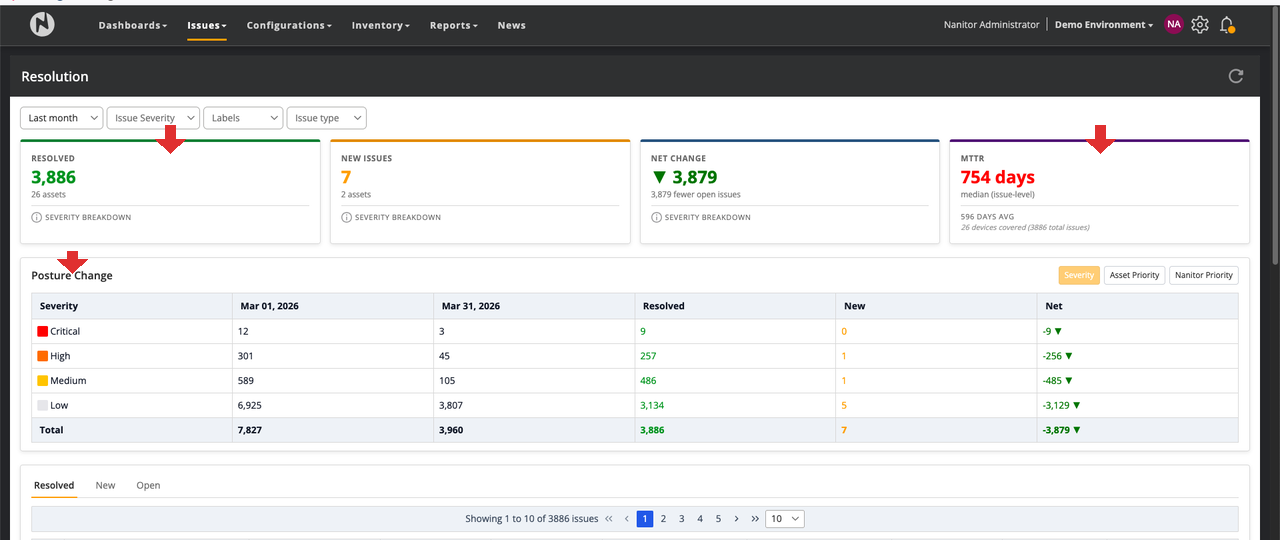
A new Issue Resolution view gives organizations a comprehensive picture of how security issues were resolved over a reporting period. Accessible from the Issues menu at /issue/resolution.
-
Summary Metrics: Total issues opened and closed, net posture change, and a breakdown by severity level; giving a clear before-and-after picture for any selected time window.
-
Posture Change Tracking: See how your security posture shifted across severity tiers, asset priority levels, and Nanitor priority weights over the chosen interval.
-
Issue Detail Tables: Paginated tables separate active open issues from resolved historical entries. Expand individual rows to see per-device time-to-resolution, first-seen dates, and resolution reasons.
-
Risk Acceptance Audit: A dedicated section tracks every risk acceptance active during the reporting period, including who created it, scope, expiration, and justification text.
This view is particularly useful for MSPs producing periodic reporting for clients, providing a clear and auditable record of security improvements made during a period.
Configurable Per-Product Vulnerability Prioritization
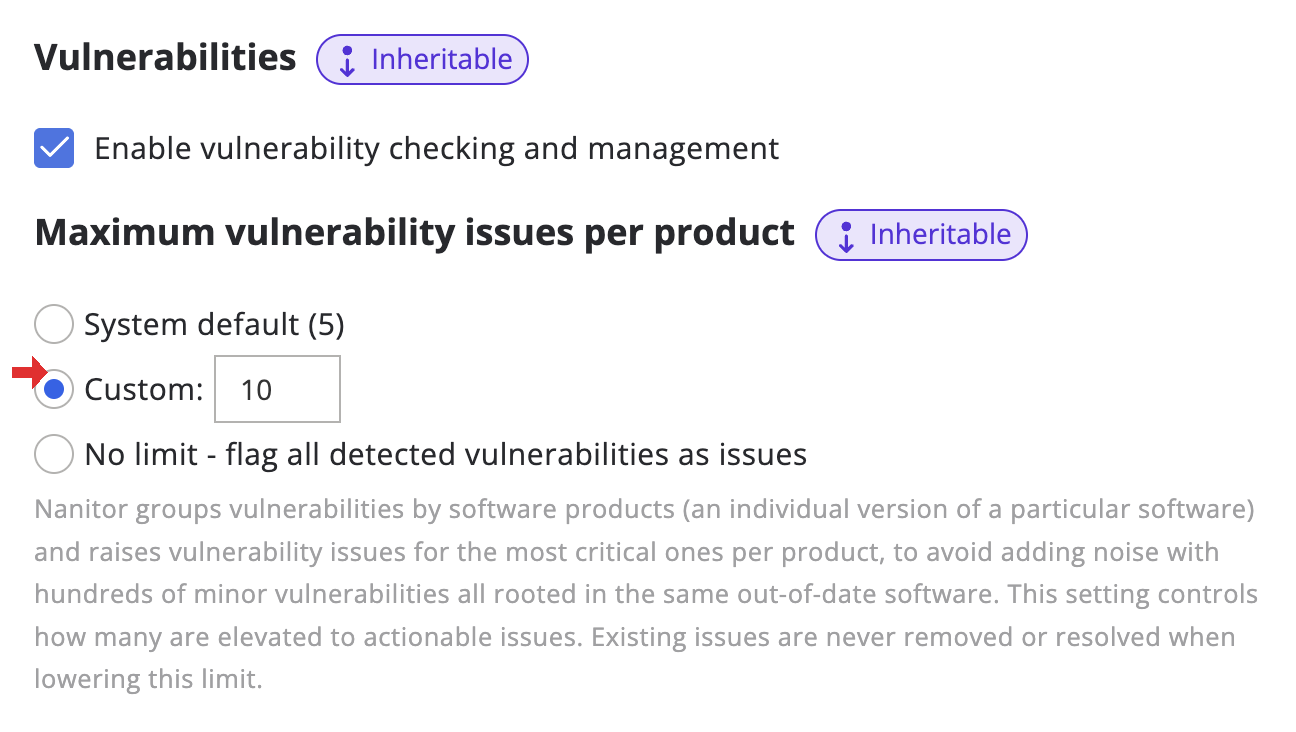
Nanitor limits how many vulnerability issues are created per product by design. Widely-installed software like Java, Adobe products, or browser components can have dozens of CVEs at any given time; surfacing each one as a separate issue makes the list harder to act on, not easier. The product is the unit of remediation: when Chrome has 15 known CVEs, the fix is "update Chrome," not 15 separate actions. The default has always been 5 issues per product, ranked by severity, so the most critical findings are always visible without flooding the issue list.
This release makes that limit configurable per organization and adds full transparency into what is detected vs. what is raised as an issue.
-
Adjustable Limit: Set a custom ceiling (1–50 issues per product) or choose Unlimited to surface every detected vulnerability as an issue. Configured under Organization Management > General Settings.
-
Priority-Based Ordering: The top-N selection now ranks by Nanitor's full issue priority, incorporating exploitability signals like EPSS and CISA KEV, rather than CVSS 3 base score alone. High-exploitability CVEs are surfaced first even when their raw CVSS score is lower.
-
Full Vulnerability Visibility: All detected vulnerabilities are now stored and accessible regardless of the issue limit. The Software Inventory shows a Vulnerabilities column (all detections) and an Issues column (how many became actionable issues) separately, e.g. "12 detected / 5 issues." Clicking the vulnerability count opens the Known Vulnerabilities view filtered to that product.
-
Existing Issues Are Preserved: Once a vulnerability has been raised as an issue, it stays open even if newer, higher-priority CVEs push it out of the top N. Issues are never silently removed when the prioritization changes; they remain open until actually resolved.
Improvements
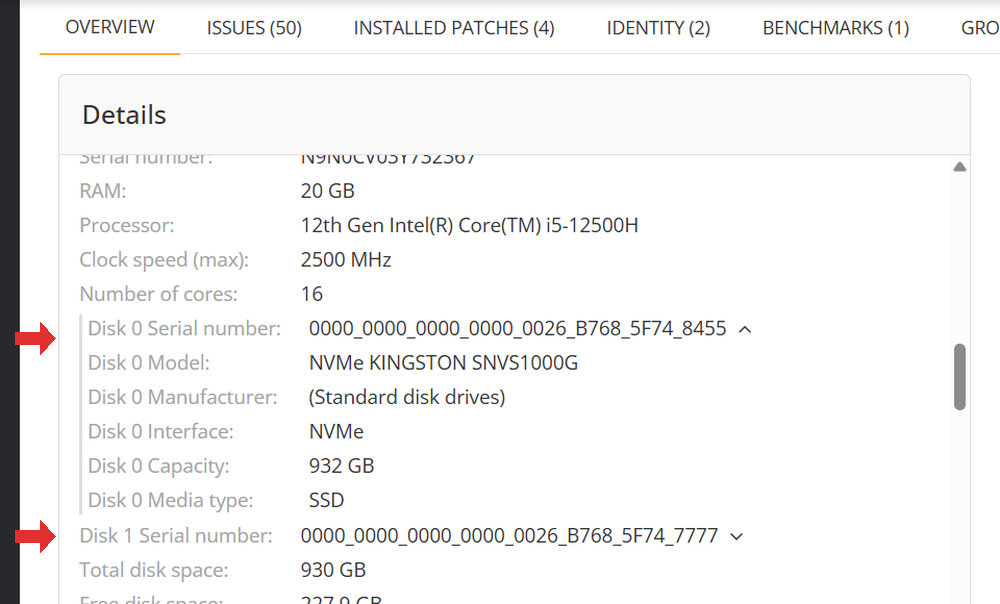
- Hard Disk Serial Number Collection. Nanitor now collects individual hard disk serial numbers and physical disk details (model, capacity, media type, interface) from Windows, Linux, and macOS endpoints. Results appear in the Device Details hardware tab as expandable disk entries; this supports asset tracking and hardware inventory workflows.
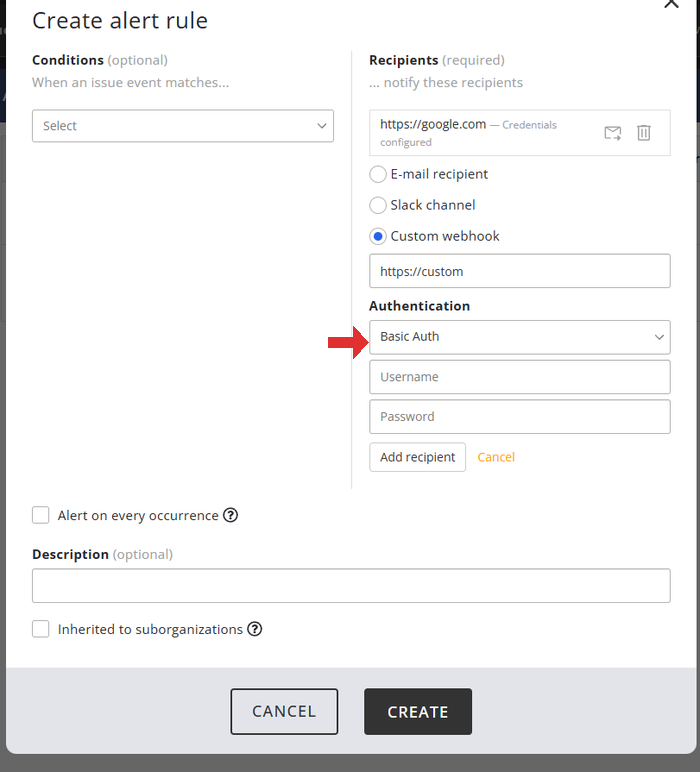
- Webhook Header Authentication. Webhooks now support header-based authentication. You can configure Basic Auth (username/password), Bearer token, or a custom API key header to integrate with platforms like ServiceNow that require proper header-based auth. Existing webhooks continue to work unchanged; they default to "None" for authentication, which is equivalent to the previous behavior. Credentials are encrypted at rest and not exposed via the API.
-
AD Resync on Demand. Administrators can now trigger a full Active Directory user resync directly from the Asset Discovery settings page. Previously, the only workaround for stale identity data was a direct database operation. (Note: this feature shipped in v7.0.0 but was missed from the v7.0.0 release notes.)
-
Feeds Overview: Ordering and Clarity. The "High-Threat Vulnerabilities" and "New Covered" widgets are now sorted by composite threat score rather than update date. CVSS score tooltips clarify that a score of 0 means "not yet scored by NVD". Pre-sync failure entries are excluded from feed sync status to reduce noise.
-
Software Inventory: Source Path Visibility. The device software list now includes a Source Path column showing the registry key path where each Windows software entry was detected. This makes it possible to identify "ghost" entries (i.e., software records left behind in the registry from deleted Windows user profiles) that were previously causing unexplained vulnerability matches.
-
Software Inventory: Publisher Search. In the "Group by Title" view (the default), searches now match against both title and publisher. Previously, searching by publisher name returned no results unless it appeared in the software title.
-
Intune Matching: AzureAD Device ID. The agent now reads and stores the
AzureADDeviceIDfrom Windows devices, enabling accurate Intune matching for devices enrolled in both Nanitor agent monitoring and Intune. Previously, Intune matching only worked for devices already imported from Intune. -
Label Deletion: Clearer Error Flow. Attempting to delete a label referenced by a Benchmark Assignment rule now shows a detailed dialog listing exactly which rules depend on the label, with shortcuts to navigate to the affected benchmark assignments.
-
Org Switch: Preserve Current Page. Switching organizations via the Change Organization dialog now navigates to the equivalent page in the new organization rather than always redirecting to the dashboard.
-
NSQ Concurrent Handlers: Configurable. The number of concurrent SCAP processing handlers is now configurable via
concurrent_handlersin the[nsq]section ofnanitor_manager.ini. Previously hardcoded to 4, the default is nowmin(CPU cores, 2). Self-hosted instances can tune this down on memory-constrained servers or up to improve throughput during peak periods. Cloud-hosted instances are unaffected.
Benchmarks & Feed Updates
The following benchmarks are targeted for this release cycle and will be available via the compliance feed within the same week of release, fetched automatically by your Nanitor server:
- CIS Microsoft Windows 11 Stand-alone v4.0.0
- CIS Debian Linux 13 (Trixie) v1.0.0
- CIS macOS 26 (Tahoe) v1.0.0
- CIS Ubuntu Linux 22.04 LTS v3.0.0 (upgraded from v1.0.0)
For current status and details on all benchmark updates, see the Benchmark Changelog.
Bug Fixes
-
Security Configurations: Incorrect Issue Counts. Fixed two separate issues causing the Security Configurations page to show counts that didn't match the issue list when clicked. A missing parenthesis in the issue count query caused over-counting; a separate frontend filtering bug caused under-counting on domain controller benchmarks.
-
SAML Login: Archived User Filter & Token Race Condition. Fixed three issues in the SAML login flow that could affect organizations with archived users or archived identity providers. In those cases, the login lookup could return the archived record instead of the active one, causing a login failure. A separate token race condition could cause intermittent auth failures when session limiting was enabled; and auth events were not fully logged.
-
Agent Signup: Duplicate Devices for AD-Discovered Hosts. Improved reliability of device matching on Windows when installing an agent on a device already discovered via Active Directory. In certain network configurations, e.g. where the IP recorded by AD was stale due to DHCP or multiple network interfaces, the agent and AD entry could end up as separate duplicate devices rather than merging correctly.
-
Rogue Device False Positives: Windows NIC Teaming. On Windows hosts using NIC teaming (LBFO, i.e. Load Balancing and Failover), the agent now reports MAC addresses for all physical adapters in the team, not just the active logical interface. This closes an edge case where stale ARP data from network discovery could fail to match the device and create a false rogue entry.
-
Requirements Download: Connection Errors. Fixed connection errors that could occur when downloading requirements from the server.
-
External Scan Results: Import Failures. Fixed a crash that could occur when importing external scan results (e.g., from Shodan) containing certain special characters, causing the import to fail silently.
-
OpenBSD: proxy-set and Agent Info Fixes. Fixed
proxy-setfailing with "Config file not found" due to an incorrect config path on OpenBSD, and correctedagent infoto display the correct log file path. -
Windows Software Inventory: Ghost HKU Entries. False vulnerability matches caused by software entries left behind from deleted Windows user profiles are now gone. The agent filters out these ghost registry entries during inventory collection.
-
Windows 11 Enterprise Multi-Session: Missing Benchmark Assignment. Devices running Windows 11 Enterprise Multi-Session were not receiving automatic benchmark assignment. This edition reports itself as "Windows 10 Enterprise Multi-Session" in the registry; Nanitor now handles this correctly and these devices will be auto-assigned the Windows 11 benchmark as expected.
-
Oracle WebLogic: Vulnerability Detection Fix. Oracle WebLogic vulnerabilities are now correctly detected. Previously, the agent's OVAL engine silently skipped these checks due to missing support for registry recursion, which WebLogic definitions use to locate installations in custom paths.
-
OTA License Upgrade: Over-Limit Orgs. Fixed a licensing bug where a license upgrade delivered via Nanitor Hub was ignored on instances where the organization had already exceeded its previous device limit. Devices now correctly transition out of
not_licensedstatus on upgrade.
Agent Updates
Windows Agent
- Collects hard disk serial numbers and physical disk details, visible in the Device Details hardware tab.
- Reads and stores
AzureADDeviceIDfor improved Intune device matching. - Ghost HKU software registry entries from orphaned user profiles are now filtered, eliminating false inventory records and vulnerability matches.
- Oracle WebLogic vulnerabilities are now correctly detected; the OVAL engine previously silently skipped these checks due to missing support for registry recursion.
- Fixed automatic benchmark assignment for Windows 11 Enterprise Multi-Session devices, which were previously not recognized correctly.
- Improved reliability of device matching for AD-discovered hosts; certain network configurations (e.g. DHCP, multiple NICs) could previously result in duplicate device entries.
- Improved MAC address reporting on NIC teaming (LBFO) configurations to include all physical team members, closing an edge case that could cause false rogue device entries.
Linux Agent
- Collects hard disk serial numbers from Linux endpoints.
macOS Agent
- Collects hard disk serial numbers from macOS endpoints.
OpenBSD Agent
- Fixed
proxy-setcommand failure and incorrect log path inagent info.
Thank you for using Nanitor! For more in-depth documentation, visit the Nanitor User Guide or our Knowledgebase.