Benchmark Overview
The benchmark overview got a facelift (from Version 2.1 onwards). It got a broader score segmentation of the baseline score of the existing benchmarks. With the facelift we renamed "Configurations" to "Security Configurations" and is available from the Configurations -> Security Configurations submenu
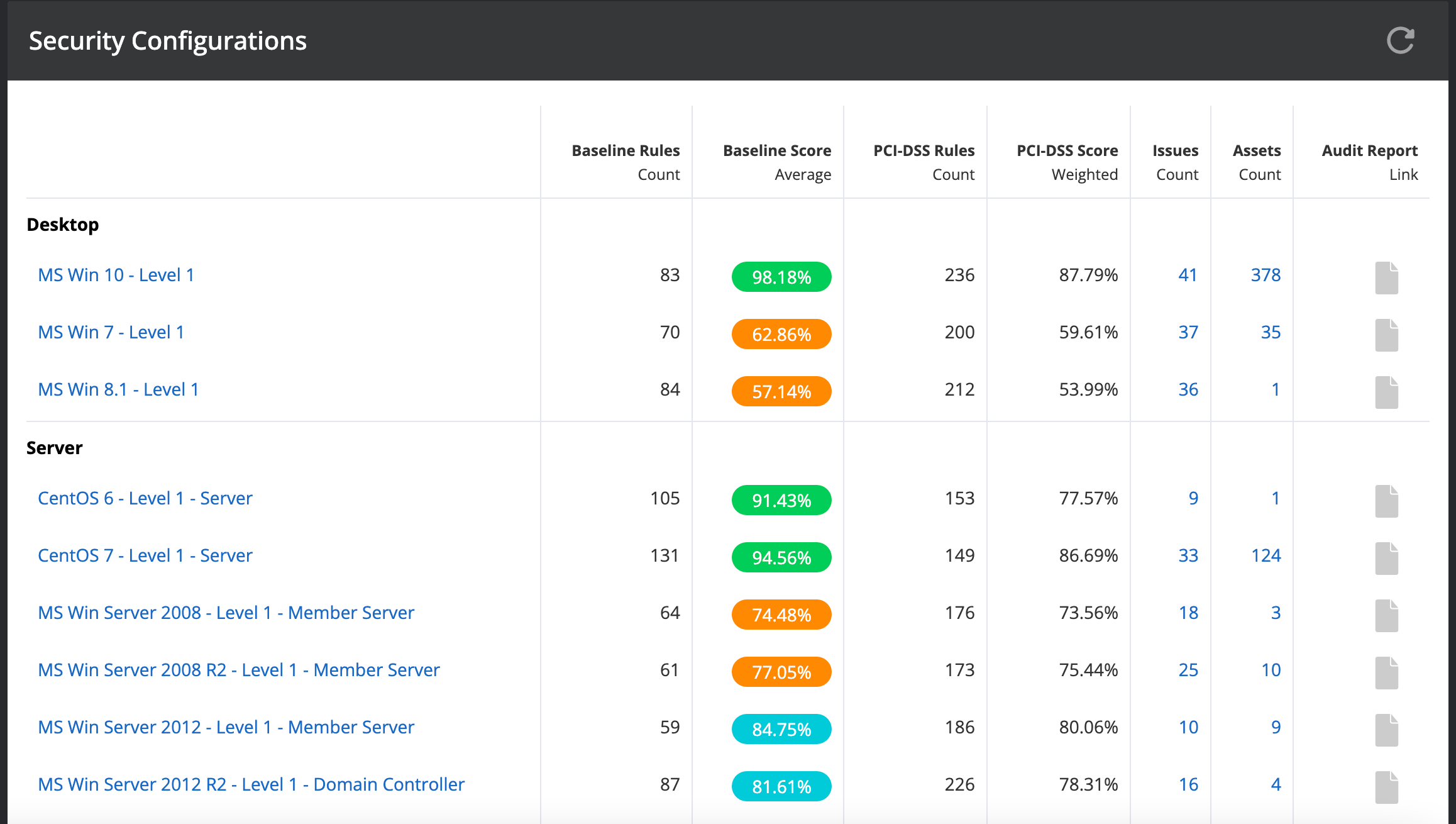
The color code is as follows:
Baseline score values: - Green / 100-90 % - Blue / 80-89 % - Orange / 50-80 % - Red / less than 50 %
Benchmark Upgrade Behavior
When a benchmark is upgraded to a newer version, rule content, checks, and remediation guidance are always updated automatically. However, two organization-level settings under Organization Management → General Settings control whether structural changes are applied automatically:
- Automatically add new rules to baseline (default: OFF) — When OFF, new rules introduced by the upgrade are not added to the baseline until an administrator explicitly applies them.
- Automatically apply severity and baseline changes (default: OFF) — When OFF, changes to rule severity and baseline membership from the upgrade are held until an administrator explicitly applies them.
These settings allow organizations to review and approve benchmark changes before they affect issue detection and prioritization. For suborganizations that use the parent baseline, these settings are inherited from the parent organization.
For a history of benchmark updates and what changed in each version, see the Benchmark Changelog.