Release notes

- Version: 7.0.0
- Build number: 14708
- Release date: 2026-04-14 (general availability)
- Server version: nanitor-7.0.0.14708-17678-master
- Agent version: nanitor-7.0.0.14708-17678-master
- Collector version: nanitor-7.0.0.14708-17678-master
Welcome to Nanitor v7.0.0!
This milestone release significantly expands Nanitor's ecosystem with a new Microsoft Intune Integration, bringing managed device inventory and compliance status from the Microsoft Graph into Nanitor's consolidated asset view. We have also introduced Configurable Benchmark Upgrade Controls, giving MSPs and security teams the ability to review and plan for benchmark upgrades before changes affect baselines, health scores, and compliance reporting. A new Vulnerable Software view in Issue Details bridges the gap between vulnerability detections and your software inventory.
Additionally, we have strengthened login security with Cloudflare Turnstile, refined the AI consent and governance framework with unified consent, audit logging, and automated data retention, and improved vulnerability scoring with CVSS 4.0 prioritization.
Highlights
Microsoft Intune Integration
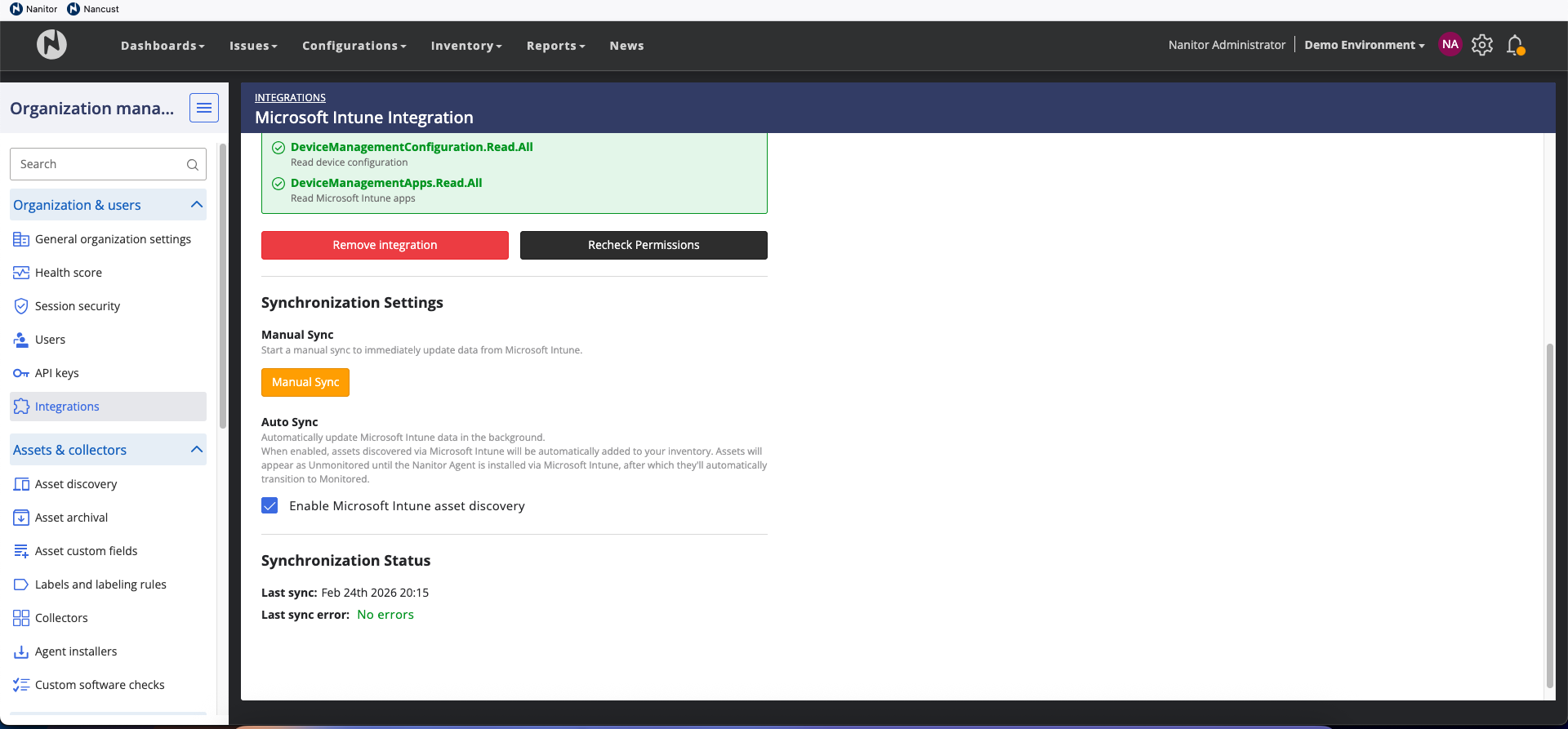
Nanitor v7.0.0 introduces a deep integration with Microsoft Intune, allowing organizations to synchronize their managed device inventory and compliance posture directly into the Nanitor platform. This integration is particularly valuable for achieving visibility into devices where a Nanitor agent may not yet be deployed.
-
Unified Asset Discovery: Automatically discover and import devices managed in Intune. Nanitor uses a matching priority — Serial Number, Azure AD Device ID, MAC address, and Hostname — to ensure that devices with both an Intune presence and a Nanitor agent are merged into a single record, preventing duplicates. Synchronization runs every 24 hours with manual sync available on-demand. Asset discovery from Intune can be enabled or disabled per organization.
-
Compliance Visibility: View Intune compliance verdicts directly within Nanitor. The "Microsoft Intune" section on the Device Detail page surfaces the device's compliance status (Compliant, Non-Compliant, In Grace Period, or Unknown), the last Intune heartbeat, and policy-level compliance details. Compliance data syncs every 6 hours.
-
Secure Authentication: Integration is established via OAuth2 using Microsoft Graph application permissions. Nanitor validates your Azure credentials before saving and separately checks the required Graph permissions, providing a clear breakdown of what is granted versus what is missing.
-
Inventory Column: A new optional "Intune Compliance" column in the Asset Inventory allows filtering and sorting your fleet by Intune status, making it easy to identify non-compliant assets or deployment gaps.
Works with Microsoft 365 Business Premium, E3, or E5 licenses. See the Microsoft Intune integration documentation for setup instructions.
Configurable Benchmark Upgrade Controls
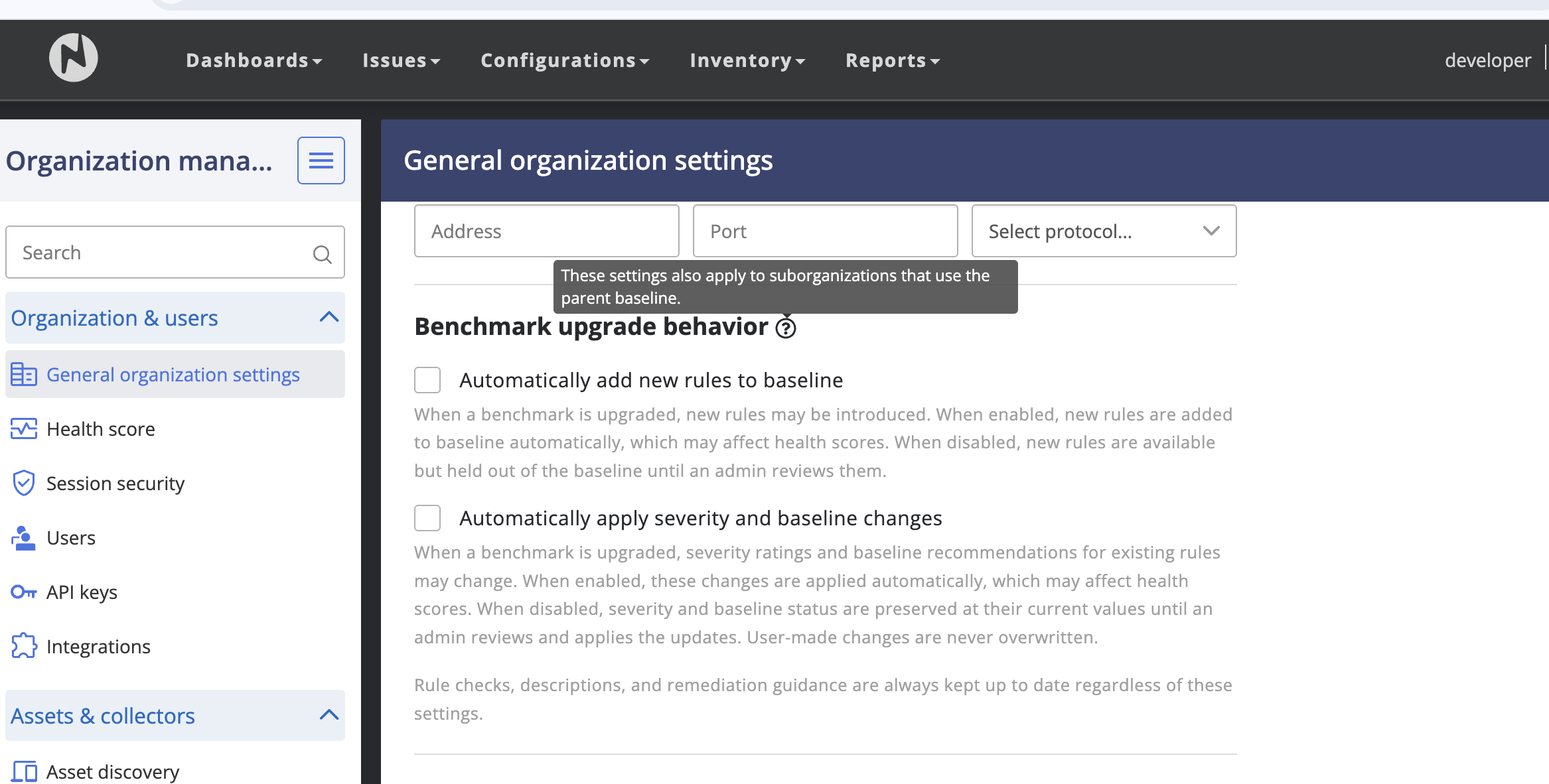
Upgrading CIS benchmarks to newer revisions has historically caused unexpected score drops when new rules are silently added to baselines. Nanitor v7.0.0 gives administrators granular control over how these upgrades impact their organization's security posture.
- Automatically add new rules to baseline (default: OFF) — New rules introduced by a benchmark upgrade are held until an administrator explicitly applies them.
- Automatically apply severity and baseline changes (default: OFF) — Severity rating and baseline membership changes from upgrades are held until explicitly applied.
Behavior change
In previous versions, benchmark upgrades automatically added new rules to baselines and applied severity changes. Starting with v7.0.0, these are held by default until an administrator explicitly applies them. If you rely on automatic baseline updates, enable these settings after upgrading.
Rule content, checks, and remediation guidance are always updated to the latest version regardless of these settings, ensuring you always have access to the best technical instructions.
Vulnerable Software Visibility
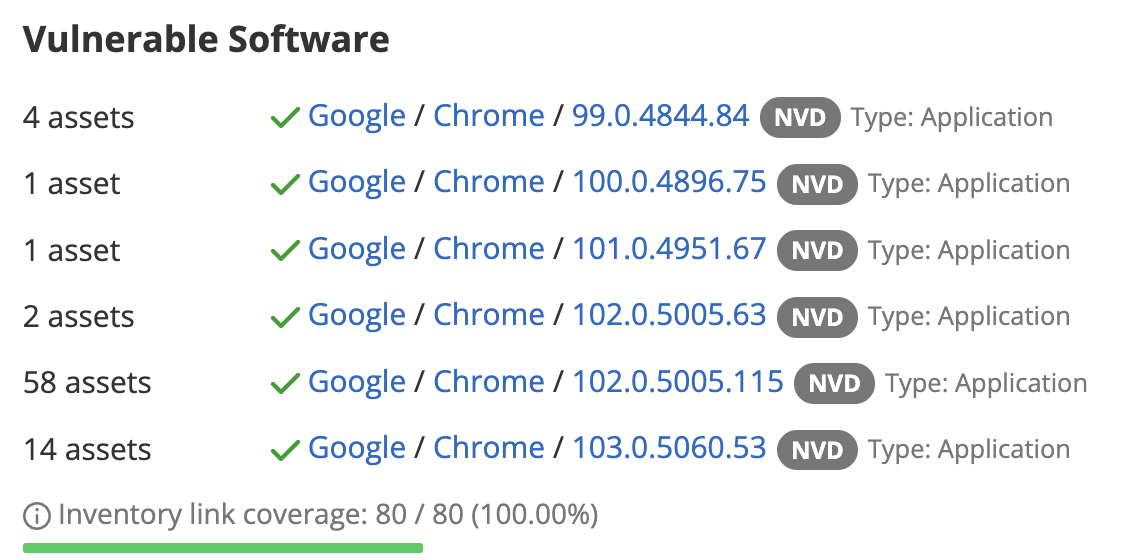
When you open a vulnerability issue, you need to know what software is affected so you can address it. Previously, the "Software Inventory" section in Issue Details could appear empty when Nanitor detected the vulnerability through an OVAL scan but could not match it to a specific item in your software inventory. This was confusing — the vulnerability was real, but the UI showed nothing, which could lead teams to assume they were not affected.
Nanitor detects vulnerabilities through two pipelines: OVAL scans evaluate machine data directly (registry keys, file paths, installed packages), while NVD/CPE matching correlates your software inventory against the National Vulnerability Database. OVAL is authoritative but does not always map back to a specific software inventory entry — for example, when a package name differs between detection and inventory, or when the vulnerable component is part of the OS rather than a standalone application.
v7.0.0 now shows detection details in this section whenever possible, so you always have context about what triggered the vulnerability:
-
Linked detections (green checkmark) show the vendor, product, and version from your software inventory with a direct link. This means Nanitor matched the vulnerability to a specific inventory item — click through to see all related information.
-
Unlinked detections (yellow warning) show what the scanner identified as vulnerable, with a tooltip explaining why there is no inventory link. The vulnerability is still real and should still be remediated — the gap is only in the inventory mapping.
-
Inventory link coverage is shown as a progress bar (e.g., "80 / 80 devices — 100%"), giving you a quick read on how well detections are connected to your software inventory for that issue.
-
Assets Tab: A new "Vulnerable software" column shows per-device detection details, and a "Software link" filter lets you narrow the list to linked or unlinked devices.
Improvements
-
AI Governance & Privacy. Nanitor's AI features (Remediation Insights and Root Cause Analysis) now have a comprehensive governance framework covering consent, data lifecycle, and auditability.
- Unified consent: A single consent dialog now covers all AI features, replacing the previous per-feature prompts. The dialog is labeled "Nanitor AI Features" and includes tiered data disclosure explaining what data is sent, a checkbox-gated acknowledgment, and an explicit Withdraw consent action. A link to the AI Data Handling and Privacy article is included. Existing users will be re-prompted to accept the updated terms.
- Audit trail: The Activity Log now records all AI interactions — RCA requests, remediation advice generated, and context profile changes — providing full visibility for compliance reviews.
- Automatic data retention: AI data is automatically cleaned up on a schedule: RCA and remediation data is deleted after 90 days, usage records after 12 months. No manual action is required.
- Rate limiting: Hub-side rate limiting prevents excessive AI requests from individual server instances. This is transparent under normal usage; users hitting the limit see a clear error message.
- Improved formatting: AI-generated RCA and remediation content now renders correctly — code blocks, lists, and file paths display as expected.
-
CVSS 4.0 Scoring. Fixed an issue where CVSS 4.0 scores were not applied to vulnerabilities when CVSS 3.x data was absent, causing affected vulnerabilities to show no priority rating ("Pending analysis"). CVSS 4.0 is now the primary score used as input to the issue priority calculation, with CVSS 3.x as a fallback when no 4.0 score is published.
-
Brute-Force Login Protection. Nanitor now supports Cloudflare Turnstile to protect the login endpoint against brute-force and credential-stuffing attacks. After repeated failed login attempts, users are presented with a CAPTCHA challenge. Hard account lockouts are explicitly avoided to prevent denial-of-service risk. Login attempts and CAPTCHA triggers are recorded in the Activity Log. This feature requires configuration — for cloud-hosted instances it will be enabled by Nanitor operations; self-hosted customers should contact support for setup guidance.
-
Device State Filtering & Export. The State column in asset and device lists now supports filtering and sorting (Active > Rogue > Unmonitored > Inactive > Pending archival > Archived). State is also included in CSV exports.
-
Agent Info: Status by Default. The
nanitor-agent infocommand now shows status fields (Last Connection, Connection Status, Next Scheduled Checkin, Runtime Status) by default without requiring the--statusflag. The--statusflag is deprecated but still accepted. Use--skip-statusfor a faster response that omits connectivity checks. -
Pip Package Discovery. The Linux agent's PyPI collector now supplements its existing user enumeration with a direct scan of home directories and system-wide site-packages paths, deduplicating results before processing. This ensures pip packages are discovered even for users whose accounts are not listed in
/etc/passwd, such as those managed by directory services on domain-joined Linux systems. -
Collector: EKS UI Cleanup. Removed AWS EKS/Kubernetes credential options from the Collector UI. EKS scanning now uses the API import model introduced in v6.8.0.
-
Malware Scanning Removal. Removed experimental malware scanning support (Varist integration). The license has ended and the feature was never generally available.
Benchmarks & Feed Updates
Benchmark updates ship separately via the compliance feed and are fetched automatically by the Nanitor server — no manual action required.
v7.0.0 ships alongside a large benchmark feed drop that takes advantage of the new benchmark upgrade controls: three major CIS version upgrades (Windows 11 Enterprise v4.0.0, Windows Server 2019 v4.0.0, RHEL 9 v2.0.0), a new Windows Server 2022 Stand-alone benchmark, and a batch of cross-benchmark false-positive fixes. The three major upgrades require Nanitor server 7.0.0 or later.
For the full list of benchmarks affected and the per-benchmark server-version requirements, see the Benchmark Changelog.
Bug Fixes
-
Debian/Ubuntu OVAL CVE Detection. Fixed an issue where OVAL vulnerability detection on Debian and Ubuntu could miss CVEs when the binary package name differs from the source package name (e.g.,
libssl3t64vs.openssl). The scanner now correctly resolves source package names for matching. -
Windows 11 24H2 Patch OVAL. Fixed an issue where the February 2026 cumulative update OVAL definition for Windows 11 24H2 (KB5077181) was not evaluating correctly due to pattern-match file objects not being included in agent output.
-
Windows Benchmark: "Deny Log On" Rules. Fixed incorrect "Deny log on" checks across Windows Server 2016, 2019, 2025, and 2025 Stand-alone benchmarks that caused false positives. The checks were evaluating the wrong user rights in some cases, reporting failures on correctly configured systems.
-
OVAL Feed Coverage "Outdated" False Alarm. Fixed an issue where the OVAL feed coverage status could incorrectly show "Outdated" even when the agent had the latest requirements and was operating normally.
-
OVAL Variable Object False Positives. Fixed false positive detections caused by incomplete data in OVAL variable objects.
-
OVAL Forensic Filtering. Forensic findings for OVAL variable objects are now filtered to show only items that genuinely failed the check, reducing noise in forensic details.
-
Hardware Info: WMI Field Mapping (Windows). Fixed the Windows agent hardware info WMI field mapping where the Model name showed the BIOS manufacturer instead of the actual system model.
-
CSV Export: Excel Compatibility. CSV exports now consistently use comma delimiters, which should work correctly with most locale and spreadsheet configurations. Previously, some exports used semicolons, which caused data to appear as a single column in Microsoft Excel.
-
Software Policy: Special Characters. Fixed a UI issue where creating a software policy for publishers with special characters (e.g., Notepad++ publisher "Don HO [email protected]") caused the whitelist/blocklist options to disappear.
-
Device Re-Signup: Decommissioned Flag. Fixed an issue where devices that were previously decommissioned and then re-signed up (e.g., after an agent reinstall) remained in a broken state with check-ins silently discarded. Re-signup now correctly clears the decommissioned flag.
-
2FA Management. Fixed an issue where organization administrators were unable to disable two-factor authentication for another user when 2FA was configured on their own account.
-
Health Score Chart. Fixed a display issue where the Target series on the health score chart was not filtered by timespan selection and the device chart axis did not rescale properly.
-
Software Vulnerability Maintenance Crash. Fixed a server crash in the software vulnerability maintenance job that could occur with certain configuration settings.
-
Diagnostic Collection Timeout. Added timeout protection to the agent's diagnostic collection to prevent it from hanging indefinitely when WMI queries are unresponsive or when enumerating large numbers of user profiles.
Agent Updates
The following agent changes are included in this release:
Linux Agent
- Pip/pypi package discovery now supplements
/etc/passwduser enumeration with a direct scan of home directories and system-wide site-packages paths, improving coverage on domain-joined systems. - Debian/Ubuntu OVAL vulnerability detection now correctly resolves source package names for matching, fixing missed CVEs when binary and source package names differ.
- The
nanitor-agent infocommand now shows status fields by default. The--statusflag is deprecated; use--skip-statusfor fast mode.
Windows Agent
- Fixed hardware info WMI field mapping — Model name now shows the correct system model instead of BIOS manufacturer.
- OVAL pattern-match file objects are now included in agent output, fixing evaluation of Windows 11 24H2 patch definitions.
- The
nanitor-agent infocommand now shows status fields by default. - Added timeout protection to diagnostic collection to prevent hangs when WMI is unresponsive or when enumerating large user profile sets.
Collector
- Removed AWS EKS/Kubernetes credential options from the Collector UI.
Thank you for using Nanitor! For more in-depth documentation, visit the Nanitor User Guide or our Knowledgebase.