Release notes

- Version: 7.2.0
- Build number: 15105
- Release date: 2026-08-11 (general availability)
- Server version: nanitor-7.2.0.15105-18004-master
- Agent version: nanitor-7.2.0.15105-18004-master
- Collector version: nanitor-7.2.0.15105-18004-master
Welcome to Nanitor v7.2.0!
This release brings benchmark upgrade visibility (notifications, activity log traceability, and baseline gap filters that make compliance changes transparent instead of silent) and introduces custom platform packages, an opt-in way to extend Nanitor's SSH-based collection to devices and platforms it doesn't natively support. We've also added export to the Issue Resolution view, consolidated vulnerability-to-software matching to close several "(Unmatched)" gaps, improved NinjaOne's MSP integration model, and shipped a wide range of accuracy and reliability fixes across vulnerability detection, benchmarks, and the agent.
Highlights
Benchmark Upgrade Visibility and Notifications
Benchmark upgrades (new rules, updated severities, archived rules) now come with visibility and traceability instead of happening silently in the background.
-
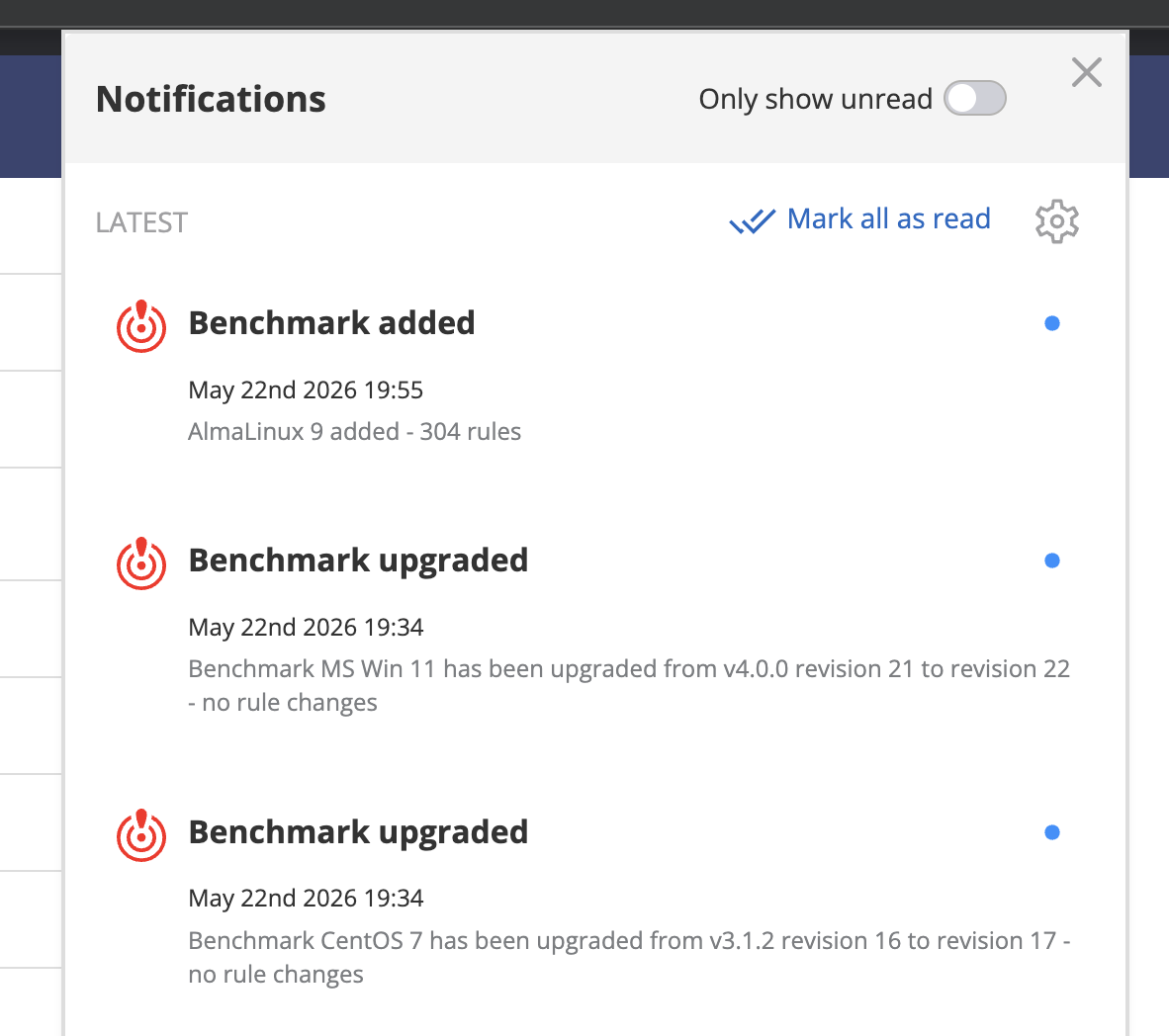
Benchmark Update Notifications: A new "Benchmark added or updated" entry in Personal Settings > Notification Settings sends System Admins and Organization Admins an immediate notification whenever a benchmark they have access to is added or upgraded (e.g., "Benchmark MS Win 11 has been upgraded from v4.0.0 revision 21 to revision 22, no rule changes"). Enabled by default; can be turned off per user.
-
Upgrade Activity Log Events: Each benchmark upgrade now generates a summary Activity Log event per affected organization (e.g., "CIS Windows Server 2022 upgraded from v4.0.0 to v5.0.0: N new rules, N updated, N removed") instead of one event per rule. Issues created or resolved as a result of an upgrade now reference the triggering upgrade in their reason/context, so you can trace a posture change back to its cause.
-
Baseline Gap Visibility: The rule list (Security Configurations page) now shows a small indicator with a tooltip on the "In baseline" and "Severity" columns whenever your organization's setting differs from Nanitor's current recommendation. New filters, "Recommended in baseline" / "Not recommended in baseline" and "Severity differs from recommended," make it easy to spot where your baseline has drifted from Nanitor's guidance.
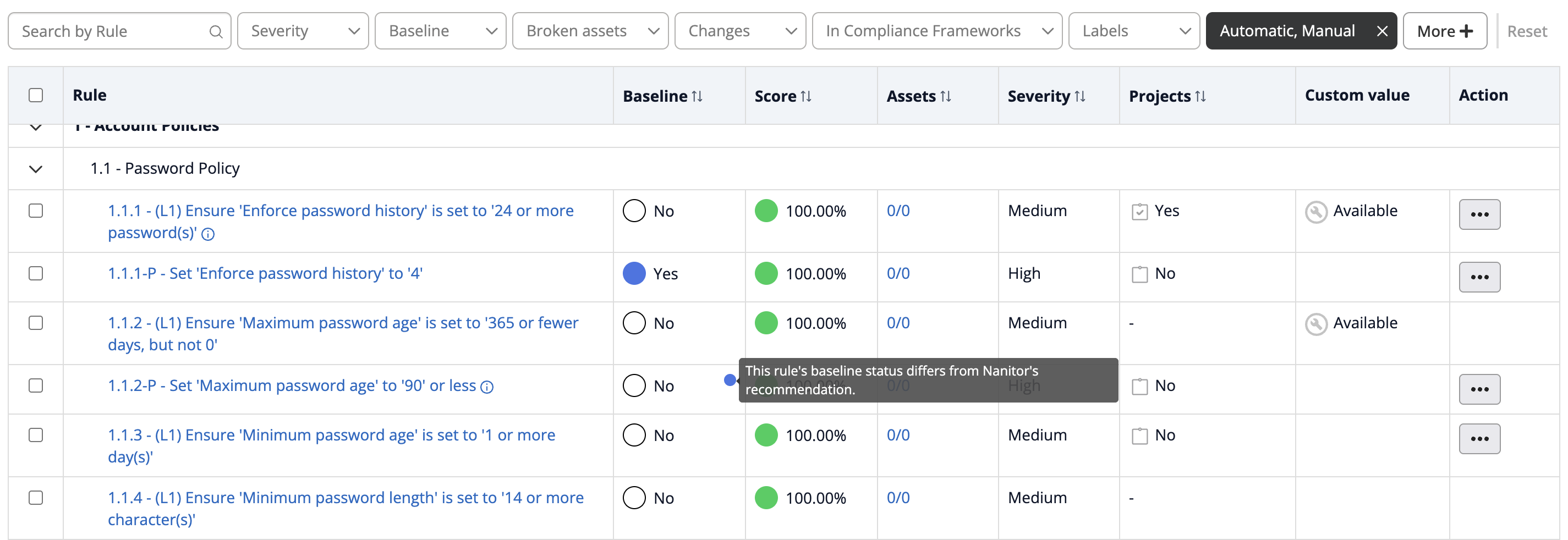
- Free Wins Filter: A new "Free wins - passing but not in baseline" option on the rule list's "In baseline" filter surfaces rules that are already passing on most devices (80%+ by default) but aren't yet in your baseline. High security value, low rollout cost, ready to add with the existing bulk add-to-baseline action.
Together, these give MSPs and admins the tools to see what changed, understand why an issue appeared, and close baseline gaps proactively.
Custom Platform Packages (SSH)
Nanitor now supports custom platform packages, an opt-in way to define your own SSH-based inventory collection for devices and platforms Nanitor doesn't natively support (for example, network gear like UniFi or Cisco Small Business switches), without waiting on native product support.
-
YAML-Defined Platforms: Platform packages are defined in YAML (SSH-based collection actions and field mapping) and loaded by the collector when enabled for an organization.
-
nandevCLI: A newnandevcommand-line tool supports the authoring workflow:nandev validatechecks a platform definition for errors, andnandev testruns SSH-based checks locally against a target host (or in a mock mode with no device needed) with clear pass/fail output, so platform packages can be built and verified before deployment. Pre-built binaries are available for macOS, Linux, and Windows, so platform developers and partners don't need a full Go build environment to get started. -
Collector & UI Support: Custom platform packages can be enabled per collector via a toggle in the UI, with platform definitions manageable alongside existing collector settings.
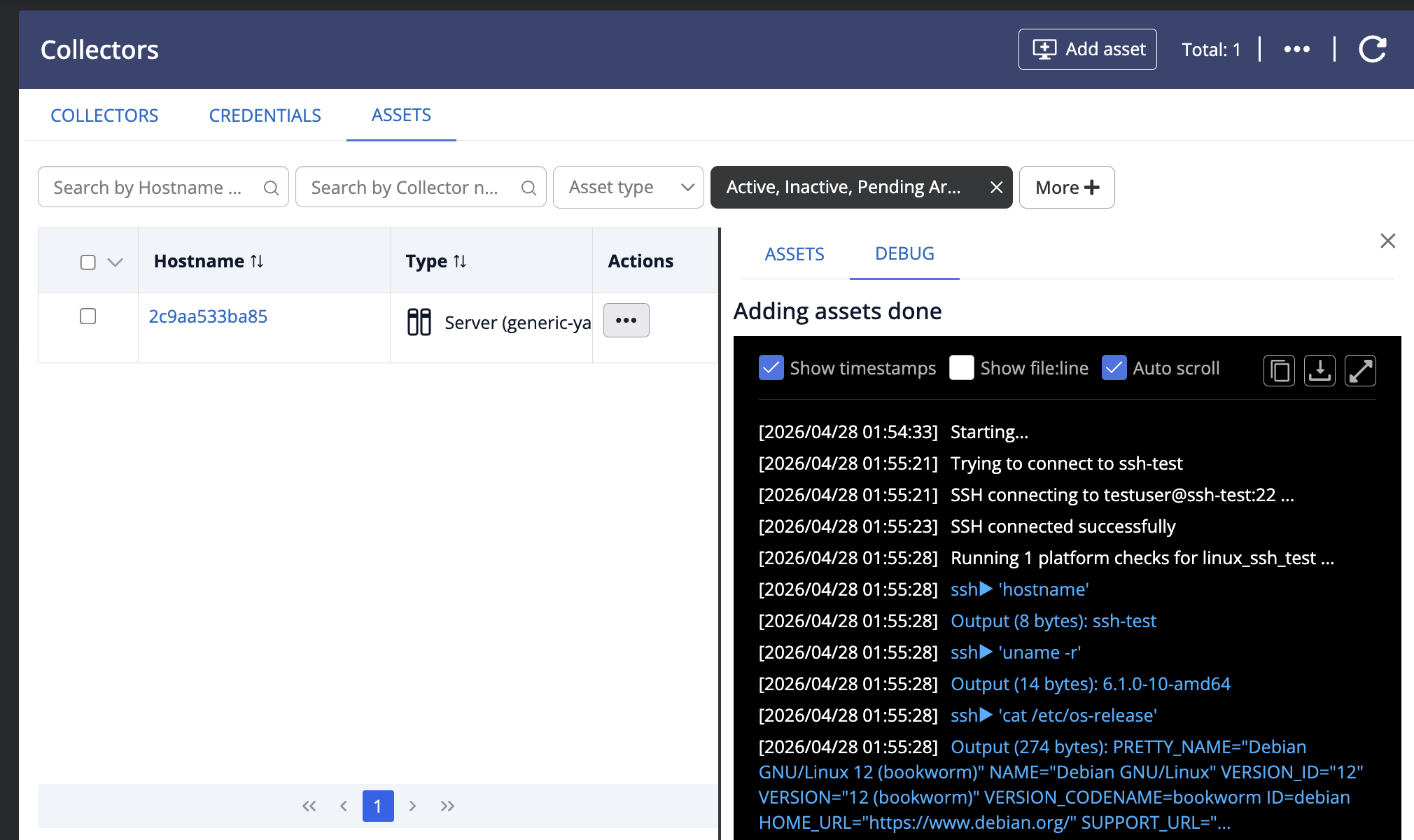
This is opt-in and intended for trusted, self-authored platform packages; it does not change behavior for existing built-in platforms. See the Custom Platform Packages documentation for the full authoring and deployment guide.
Improvements
Issue Resolution & Projects
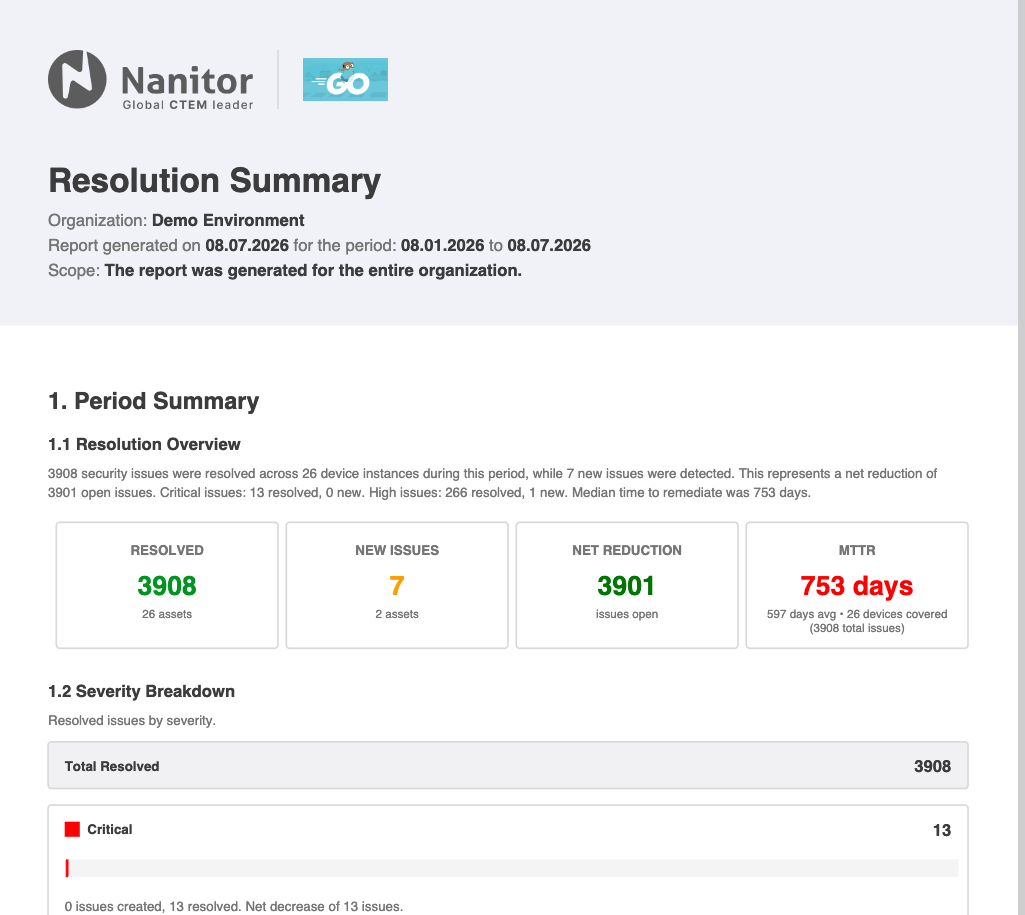
- Issue Resolution: PDF and CSV Export. The Issue Resolution view (introduced in v7.1.0) now supports export, with a choice of Summary or Full Detail level. The PDF is a client-ready "Resolution Summary" report with an auto-generated narrative summary, severity breakdowns, a before/after posture change table, a top-20 resolved-issues table (by severity) and top-20 new-issues table, and a dedicated Risk Accepted section listing issues where remediation was deferred by an approved business decision. Designed to hand directly to a non-technical client. The CSV export provides a flat, row-level dataset (one row per device-issue occurrence) with lifecycle timestamps, resolution duration, and resolved reason, for further analysis.
-
Issue Resolution: Navigation Links. Issue titles and asset hostnames on the Issue Resolution page are now clickable links to their respective detail pages, with the standard asset hover card on hostnames.
-
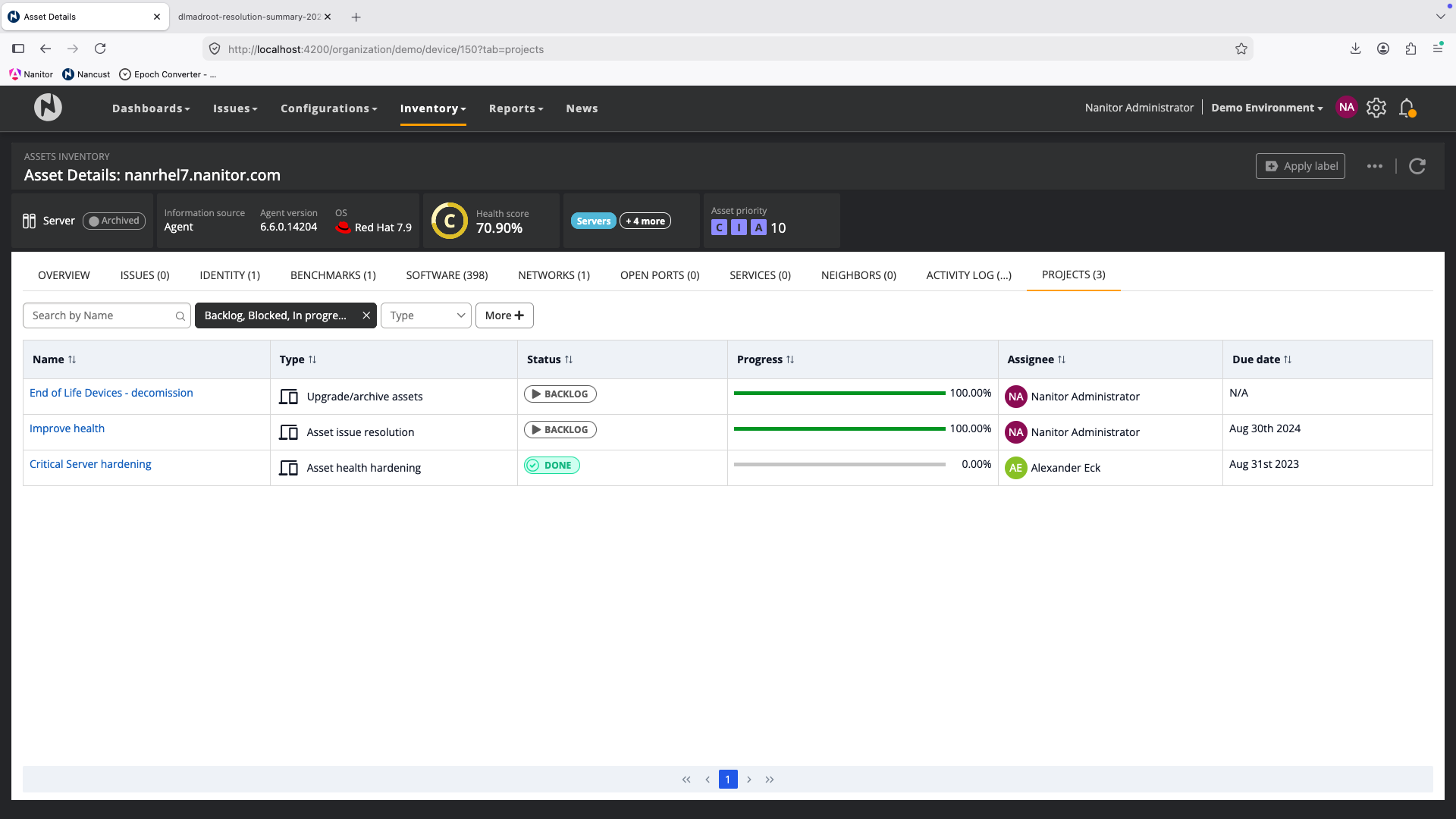
Asset Detail: New Projects Tab. The Asset Details page now has a Projects tab, showing every project the asset is in scope for (via direct assignment, label-based scope, or org-wide scope), including active and historical/archived projects, with type, status, progress, and a link to each project. Project membership logic was also made consistent across the asset Projects tab, asset details, and asset list; org-wide-scope projects now reliably show up wherever asset-project associations are displayed.
- Bulk Request Recheck for Projects. The Asset Progress view within a Project now supports a bulk "Request Recheck" action across selected or filtered assets, matching the existing per-issue Request Recheck behavior. Previously this required opening each asset individually.
Vulnerability Management
- Vulnerability-to-Software Inventory Matching. Consolidated how detected vulnerabilities (from CPE data and OVAL scans) are matched to canonical products and linked to Software Inventory entries, replacing several inconsistent matching paths with one shared implementation. This fixes cases where a vulnerability was detected correctly but showed as "(Unmatched)" with 0% inventory link coverage, for example, OVAL-detected Debian package vulnerabilities that didn't link to the matching Software Inventory entry due to a version-format mismatch. Further matching improvements will follow in subsequent releases.
Benchmarks & Compliance
-
ESXi Benchmark: vCLS VM Exclusion. VMware vCLS (vSphere Cluster Services) VMs, which are created and managed automatically by VMware and not user-modifiable, are now excluded from ESXi benchmark evaluation by default, so they no longer inflate issue counts or unfairly lower health scores.
-
macOS Benchmark Support: Gatekeeper & System Settings. Added OVAL object support for Gatekeeper and system settings checks on macOS, enabling benchmark rules that reference these objects to evaluate correctly on the Darwin agent.
AI Features
-
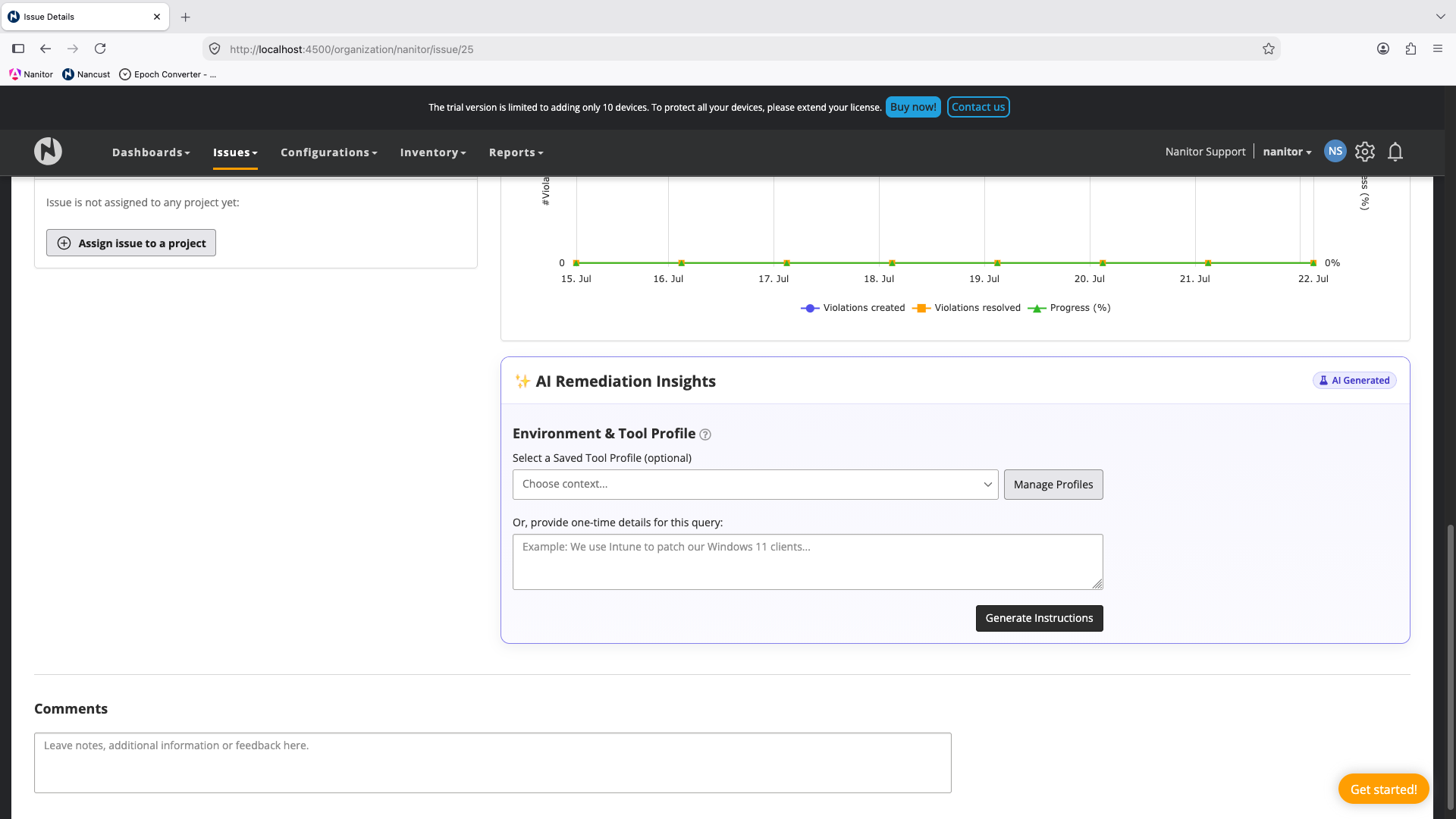
AI Remediation: Tool Profile Validation Feedback. Improved the validation flow for Environment & Tool Profile descriptions in AI Remediation Insights. Users now get clearer feedback when a description needs revision, instead of profiles landing in an unreviewable "verify" state with no explanation.
-
AI Remediation Insights: Styling and Disclaimer. Aligned the visual styling of AI Remediation Insights with AI Root Cause Analysis for a consistent look, and replaced the "Experimental" badge with a clearer disclaimer that better reflects the feature's general-availability status while still flagging that suggested remediation commands should be reviewed before running.
Integrations & API
-
NinjaOne: Parent-Level Organization Linking. MSPs using a single NinjaOne Division across multiple customer organizations can now configure the integration once at the parent org level, with explicit mapping from each NinjaOne organization to the corresponding Nanitor sub-organization. Devices sync to the correct Nanitor org automatically based on this mapping. Previously, the integration had to be configured per-org independently with no shared authentication, which didn't fit the MSP parent/sub-org model.
-
System API: OS Version in Asset Response. The
/system_api/assetsendpoint now includes OS major and minor version alongside the existing OS name field, rather than requiring benchmark assignment as an unreliable proxy for OS version.
Agent & Platform
-
Linux Local User Identity Discovery. Linux identity data (e.g., password expiration policy) is now collected directly from account and shadow data rather than only from currently logged-in TTY sessions, fixing stale identity records for logged-out users and reducing false positives from an unreliable fallback default.
-
Web UI Framework Upgrade. Upgraded the web interface to Angular 21, keeping the platform on a fully supported framework release. No user-facing behavior changes.
Benchmarks & Feed Updates
The following benchmarks are targeted for this release cycle and will be available via the compliance feed once QA validation is complete, typically within a week or two of the server release, fetched automatically by your Nanitor server:
- New benchmark: CIS Rocky Linux 9 v2.0.0
- New benchmark: CIS Amazon Linux 2023 v1.0.0
- CIS Debian Linux 11 upgraded from v1.0.0 to v2.0.0
- CIS Debian Linux 12 upgraded from v1.0.0 to v1.1.0
- CIS Ubuntu Linux 20.04 LTS upgraded from v2.0.1 to v3.0.0
- CIS Microsoft Windows Server 2022 upgraded from v4.0.0 to v5.0.0
- CIS Microsoft Windows 11 Enterprise upgraded from v4.0.0 to v5.0.1
For current status and details on all benchmark updates, see the Benchmark Changelog.
Bug Fixes
Vulnerability Detection & Accuracy
-
Azul/Zulu JDK: Software Inventory Link. Fixed Azul Zulu JDK products not matching CPE aliases, which caused OVAL-detected vulnerabilities (e.g., CVE-2023-41993) to appear in the issue list while the Software Inventory entry showed 0 vulnerabilities for the same device.
-
Notepad++ False Negative on Windows 11. Fixed a false negative for CVE-2025-15556 (Notepad++) on Windows 11 caused by incorrect executable path resolution in the OVAL definition.
-
RPM Vulnerability Detection: Mixed-Signature False Negatives. Fixed a caching issue in RPM package evaluation that could drop version/signature data for additional installed versions of the same package, risking false negatives on devices with multiple installed kernel or package versions.
-
OpenSCAP: Multiline Content Truncation. Fixed OVAL definitions using multiline
textfilecontent54objects always evaluating false due to collected text being truncated to its first line before evaluation, causing affected devices to go undetected on module-stream-based checks. -
Stuck Vulnerability Items After In-Place OS Upgrade. Fixed patch-related vulnerability items not clearing correctly after an in-place OS upgrade (e.g., Windows Server 2012 R2 to Windows Server 2025), which could leave them stuck open indefinitely.
-
IIS Application Pool Identity False Positives. Fixed the agent defaulting to "NetworkService" instead of the correct IIS default "ApplicationPoolIdentity" when reading application pool configuration, which caused false positive failures on the CIS IIS 10 benchmark.
-
Windows Registry Probe: Variable-Depth Path Patterns. Added support for OVAL registry patterns that use regex-based, repeating path segments to match registry keys at varying depths. Vulnerability definitions relying on this pattern now evaluate correctly.
-
Windows OVAL: Process Object Support. Implemented support for
process58_objectin Windows SCAP processing, fixing "Object not in scope" errors that prevented several Java vulnerability checks (e.g., embedded Java process detection) from evaluating correctly. -
Broken MSRC Advisory Links. Fixed vulnerability remediation descriptions linking to the retired
portal.msrc.microsoft.comadvisory pages (404s) for older Microsoft CVEs. Links now point to the currentmsrc.microsoft.com/update-guideformat.
Performance & Reliability
-
Project Activity Log: Slow Loading on Large Instances. Fixed a project-scoped activity log query that, in certain cases on large instances, could take a very long time to complete and appear stuck.
-
Vulnerability Processing Throughput on Large Servers. Fixed a vulnerability-result processing queue that ran single-threaded regardless of configuration, causing large servers to fall behind after high-volume events like Patch Tuesday.
-
Issue Resolution View: Slow Load Times. Fixed a database query plan issue causing posture snapshot queries on the Issue Resolution view to take several minutes on large instances.
-
Vulnerability Check-in Queue Buildup. Fixed a vulnerability check-in queue that could accumulate large volumes of redundant messages per device under load (e.g., after a feed update or Patch Tuesday), improving processing reliability on busy servers.
UI & Workflow Fixes
-
Asset CSV Export: Missing "Last Login User" Column. Added the "Last Login User" column to the CSV export when exporting assets from a Project (Projects > Assets > Export Assets as CSV), matching the column already available in the main Asset Inventory export.
-
Benchmark CSV Export: Filter Not Applied. Fixed benchmark result CSV exports not reflecting an applied filter. Exported pass/fail/asset counts now match the filtered view shown on screen.
-
CSV Export: Embedded Newlines. Description fields in CSV exports no longer contain embedded newlines, which previously caused rendering issues when opened in Excel.
-
Project Progress: Inconsistent Percentage Display. Fixed an "Issue Resolution" project showing a non-zero overall progress percentage while every issue in the project simultaneously showed 0 resolved assets, caused by the header and per-issue figures using different calculation methods.
-
Inheritable Label Editing for Org Admins. Org Admins in an organization with no sub-organizations can now edit or delete inheritable labels (such as Nanitor's default labels) without needing the
role_inheritablepermission or System Admin access. Organizations with sub-organizations are unaffected by this change. -
Admin Route Race Condition. Fixed a race condition between two route guards that could incorrectly redirect a user out of admin routes when profile information hadn't finished loading.
-
Issue Configuration: Unable to Change Severity. Fixed an issue preventing users from changing issue severity in Issue Configuration.
-
Projects: Affected Assets Tab. Fixed an issue where the Affected Assets tab on a Project failed to load.
-
Software Aliasing: Portal Sync Errors. Fixed a customer portal sync error that could occur when renaming or merging aliased software entries and the new name clashed with an existing one.
-
Issue Trend Charts: Timeout on Filters. Fixed a timeout that occurred when applying filters on the Issue Trend Metrics page. Trend charts also no longer select all issue types by default, reducing query load and improving initial load time.
Agent Updates
The following agent-side changes are included in this release, summarized here for planning fleet-wide agent upgrades:
Windows Agent
- Fixed the IIS application pool identity defaulting to "NetworkService" instead of the correct "ApplicationPoolIdentity", which caused false positive failures on the CIS IIS 10 benchmark.
- Added support for OVAL registry patterns using regex-based, repeating path segments to match keys at varying depths.
- Implemented support for
process58_objectin Windows SCAP processing, fixing evaluation of several Java vulnerability checks.
Linux Agent
- Local user identity data (e.g., password expiration policy) is now collected directly from account and shadow data rather than only from currently logged-in TTY sessions, fixing stale records and reducing false positives.
- Fixed a caching issue in RPM package evaluation that could drop version/signature data for additional installed versions of the same package, reducing false negatives in mixed-signature scenarios.
- Fixed OVAL definitions using multiline
textfilecontent54objects always evaluating false due to truncated content, affecting module-stream-based checks.
macOS Agent
- Added collection support for Gatekeeper and system settings data, so benchmark rules referencing these objects can now evaluate (previously unsupported).
Thank you for using Nanitor! For more in-depth documentation, visit the Nanitor User Guide or our Knowledgebase.